mirror of
https://github.com/infiniflow/ragflow.git
synced 2026-07-06 11:28:38 +08:00
 3f805a64f1
## Summary

Aligns the **Go agent runtime/canvas/components/tools** behavior with
the **Python `agent/` implementation** so the same stored canvas DSL
produces the same execution result on either side. Every component,
tool, and runtime primitive in `internal/agent/` is now driven by the
same semantics as its Python counterpart — variable resolution, template
substitution, control flow, error reporting, retry/cancel, and stream
event shapes.

The **retrieval component is the one explicit exception** in this PR. It
is being reworked in a separate change and is excluded from this
alignment pass; the wrapper slot (`universe_a_wrappers.go →
newRetrievalComponent`) is preserved.

## Scope of alignment

### Components (all aligned with `agent/component/`)
`Begin` · `Message` · `LLM` (incl. ChatTemplateKwargs,
MessageHistoryWindowSize, VisualFiles, Cite, OutputStructure,
JSONOutput, TopP, MaxRetries, DelayAfterError, credentials) · `Agent`
(react + tool artifact capture + `Reset()` interface-assert) · `Switch`
(12/12 operators, Python-equivalent semantics) · `Categorize` · `Invoke`
· `Iteration` · `Loop` (macro-expansion through `workflowx.AddLoopNode`)
· `UserFillUp` (Python-equivalent interrupt/resume via eino
`compose.Interrupt`/`ResumeWithData`) · `FillUp` · `DataOperations` ·
`ListOperations` · `StringTransform` · `VariableAggregator` ·
`VariableAssigner` · `Browser` (full stagehand runtime parity) ·
`DocsGenerator` · `ExcelProcessor`.

### Tools (all aligned with `agent/tools/`)
`Retrieval` (wrapper slot only — logic out of scope) · `MCPToolAdapter`
(streamable-HTTP) · `CodeExec` (sandbox bridge with
`code_exec_contract.go` matching Python contract) · `AkShare` · `ArXiv`
· `Crawler` · `DeepL` · `DuckDuckGo` · `Email` · `ExeSQL` · `GitHub` ·
`Google` · `GoogleScholar` · `Jin10` · `PubMed` · `QWeather` · `SearXNG`
· `Tavily` · `Tushare` · `Wencai` · `Wikipedia` · `YahooFinance` —
uniform `eino tool.InvokableTool` interface, SSRF protection, shared
HTTP client.

### Canvas execution engine (`internal/agent/canvas/`)
Aligned with Python's `agent/canvas.py`:
- **Scheduler** (`scheduler.go`): state pre/post handlers, node lambdas,
per-component timeout resolver (4-level: per-class env → per-class table
→ uniform env → 600s fallback), `legacyNoOpNames`.
- **Loop subgraph** (`loop_subgraph.go`): Python-equivalent
`AddLoopNode` macro expansion + condition translation.
- **Multibranch** (`multibranch.go`): `Switch` / `Categorize` routing
via `compose.NewGraphMultiBranch` — same branch selection semantics as
Python.
- **Parallel subgraph** (`parallel_subgraph.go`): matches Python's
parallel fan-out contract.
- **Interrupt/Resume** (`interrupt_resume.go`): `UserFillUpNodeBody` /
`IsInterruptError` / `ExtractInterruptContexts` — replaces the
deprecated Python sentinel chain with eino's native interrupt API,
preserving the same external behavior.
- **Checkpoint** (`checkpoint_store.go`): `RedisCheckPointStore`
Get/Set/Delete, with business metadata (status / canvas_id /
parent_run_id) on a parallel Redis Hash.
- **RunTracker** (`run_tracker.go`): Start / MarkSucceeded / MarkFailed
/ MarkCancelled / AttachCheckpoint — same lifecycle as the Python run
record.
- **Cancel** (`cancel.go`): Redis pub/sub watch.
- **Stream** (`stream.go`): SSE channel with `messages` / `waiting` /
`errors` / `done` events, same shape as Python's `agent.canvas.RunEvent`
payload.

### DSL bridge (`internal/agent/dsl/`)
- `normalize.go`: v1↔v2 collapsed into a single wire format — Python and
Go consume the same stored JSON.
- `reset.go`: per-run state reset matches Python's `Canvas.reset()`
semantics.
- Testdata mirrors Python's `agent_msg.json` / `all.json` / etc.

### Runtime (`internal/agent/runtime/`)
- `CanvasState` / `NewCanvasState` / `GetVar` / `SetVar` / `ReadVars`:
same `{{cpn_id@param}}` resolution model.
- `ResolveTemplate` (regex fast path + gonja fallback) — Python
Jinja-style semantics.
- `selector.go`, `metrics.go`, `component.go`: shared runtime contracts.

## Out of scope (intentionally)

- **`Retrieval` component logic** — wrapped only; full parity lands in a
follow-up PR.
- **Frontend** — only minor dsl-bridge / canvas UX fixes ride along.
- **CLI / admin / model registry** — orthogonal to agent behavior.

## How alignment is verified

`internal/service/agent_run_e2e_test.go` exercises the **full production
chain** against real Python-shaped DSL fixtures:
```
loadCanvasForUser → versionDAO.GetLatest → decodeCanvasFromDSL →
canvas.Compile → cc.Workflow.Invoke → answer extraction
```
using in-memory SQLite + miniredis (no Docker). Covers:
- `TestRunAgent_RealCanvas_BeginMessage` — happy path, `{{sys.query}}`
resolution
- `TestRunAgent_RealCanvas_WaitForUserResume` — two-run resume cycle
(Python-equivalent)
- `TestRunAgent_RealCanvas_CompileFails` — unknown component name →
sanitized error (Python-equivalent)
- `TestRunAgent_RealCanvas_InvokeFails` — unresolvable template ref
(Python-equivalent)
- `TestRunAgent_RunTracker_AttachCheckpoint_CallSequence` —
Start→AttachCheckpoint→MarkSucceeded lifecycle

`internal/handler/agent_test.go` — SSE streaming parity (`Content-Type:
text/event-stream`, `data: {…}\n\n`, trailing `data: [DONE]\n\n`,
OpenAI-compatible non-stream `choices`).

`internal/agent/canvas/fixture_compile_test.go` + per-component tests
pin the Python-equivalent outputs.

```
go test -count=1 -v -run 'TestRunAgent_RealCanvas|TestRunAgent_RunTracker' ./internal/service/
```

## Design reference

`docs/develop/agent-go-port-design.md` (1329 lines, last cross-checked
2026-06-17) — module layout, per-component / per-tool inventory,
corner-case catalogue, and the actionable backlog (Section 14, including
the retrieval alignment follow-up).

---------

Co-authored-by: Claude <noreply@anthropic.com>
386 lines
19 KiB
Markdown
386 lines
19 KiB
Markdown
<div align="center">
|
||
<a href="https://cloud.ragflow.io/">
|
||
<img src="web/src/assets/logo-with-text.svg" width="350" alt="ragflow logo">
|
||
</a>
|
||
</div>
|
||
|
||
<p align="center">
|
||
<a href="./README.md"><img alt="README in English" src="https://img.shields.io/badge/English-DFE0E5"></a>
|
||
<a href="./README_zh.md"><img alt="简体中文版自述文件" src="https://img.shields.io/badge/简体中文-DFE0E5"></a>
|
||
<a href="./README_tzh.md"><img alt="繁體中文版自述文件" src="https://img.shields.io/badge/繁體中文-DFE0E5"></a>
|
||
<a href="./README_ja.md"><img alt="日本語のREADME" src="https://img.shields.io/badge/日本語-DBEDFA"></a>
|
||
<a href="./README_ko.md"><img alt="한국어" src="https://img.shields.io/badge/한국어-DFE0E5"></a>
|
||
<a href="./README_fr.md"><img alt="README en Français" src="https://img.shields.io/badge/Français-DFE0E5"></a>
|
||
<a href="./README_id.md"><img alt="Bahasa Indonesia" src="https://img.shields.io/badge/Bahasa Indonesia-DFE0E5"></a>
|
||
<a href="./README_pt_br.md"><img alt="Português(Brasil)" src="https://img.shields.io/badge/Português(Brasil)-DFE0E5"></a>
|
||
<a href="./README_ar.md"><img alt="README in Arabic" src="https://img.shields.io/badge/Arabic-DFE0E5"></a>
|
||
<a href="./README_tr.md"><img alt="Türkçe README" src="https://img.shields.io/badge/Türkçe-DFE0E5"></a>
|
||
</p>
|
||
|
||
<p align="center">
|
||
<a href="https://x.com/intent/follow?screen_name=infiniflowai" target="_blank">
|
||
<img src="https://img.shields.io/twitter/follow/infiniflow?logo=X&color=%20%23f5f5f5" alt="follow on X(Twitter)">
|
||
</a>
|
||
<a href="https://cloud.ragflow.io" target="_blank">
|
||
<img alt="Static Badge" src="https://img.shields.io/badge/Get-Started-4e6b99">
|
||
</a>
|
||
<a href="https://hub.docker.com/r/infiniflow/ragflow" target="_blank">
|
||
<img src="https://img.shields.io/docker/pulls/infiniflow/ragflow?label=Docker%20Pulls&color=0db7ed&logo=docker&logoColor=white&style=flat-square" alt="docker pull infiniflow/ragflow:v0.26.1">
|
||
</a>
|
||
<a href="https://github.com/infiniflow/ragflow/releases/latest">
|
||
<img src="https://img.shields.io/github/v/release/infiniflow/ragflow?color=blue&label=Latest%20Release" alt="Latest Release">
|
||
</a>
|
||
<a href="https://github.com/infiniflow/ragflow/blob/main/LICENSE">
|
||
<img height="21" src="https://img.shields.io/badge/License-Apache--2.0-ffffff?labelColor=d4eaf7&color=2e6cc4" alt="license">
|
||
</a>
|
||
<a href="https://deepwiki.com/infiniflow/ragflow">
|
||
<img alt="Ask DeepWiki" src="https://deepwiki.com/badge.svg">
|
||
</a>
|
||
</p>
|
||
|
||
<h4 align="center">
|
||
<a href="https://cloud.ragflow.io">Cloud</a> |
|
||
<a href="https://ragflow.io/docs/dev/">Document</a> |
|
||
<a href="https://github.com/infiniflow/ragflow/issues/12241">Roadmap</a> |
|
||
<a href="https://discord.gg/NjYzJD3GM3">Discord</a>
|
||
</h4>
|
||
|
||
<div align="center" style="margin-top:20px;margin-bottom:20px;">
|
||
<img src="https://raw.githubusercontent.com/infiniflow/ragflow-docs/refs/heads/image/image/ragflow-octoverse.png" width="1200"/>
|
||
</div>
|
||
|
||
<div align="center">
|
||
<a href="https://trendshift.io/repositories/9064" target="_blank"><img src="https://trendshift.io/api/badge/repositories/9064" alt="infiniflow%2Fragflow | Trendshift" style="width: 250px; height: 55px;" width="250" height="55"/></a>
|
||
</div>
|
||
|
||
## 💡 RAGFlow とは?
|
||
|
||
[RAGFlow](https://ragflow.io/) は、先進的な[RAG](https://ragflow.io/basics/what-is-rag)(Retrieval-Augmented Generation)技術と Agent 機能を融合し、大規模言語モデル(LLM)に優れたコンテキスト層を構築する最先端のオープンソース RAG エンジンです。あらゆる規模の企業に対応可能な合理化された RAG ワークフローを提供し、統合型[コンテキストエンジン](https://ragflow.io/basics/what-is-agent-context-engine)と事前構築されたAgentテンプレートにより、開発者が複雑なデータを驚異的な効率性と精度で高精細なプロダクションレディAIシステムへ変換することを可能にします。
|
||
|
||
## 🎮 はじめに
|
||
|
||
当社のクラウドサービスをぜひお試しください:[https://cloud.ragflow.io](https://cloud.ragflow.io)。
|
||
|
||
<div align="center" style="margin-top:20px;margin-bottom:20px;">
|
||
<img src="https://raw.githubusercontent.com/infiniflow/ragflow-docs/refs/heads/image/image/chunking.gif" width="1200"/>
|
||
<img src="https://raw.githubusercontent.com/infiniflow/ragflow-docs/refs/heads/image/image/agentic-dark.gif" width="1200"/>
|
||
</div>
|
||
|
||
## 🔥 最新情報
|
||
|
||
- 2026-06-15 Feishu、Discord、Telegram、Lineなどの複数のチャットチャンネルをサポートします。
|
||
- 2026-04-24 DeepSeek v4 をサポート。
|
||
- 2026-03-24 [RAGFlow Skill on OpenClaw](https://clawhub.ai/yingfeng/ragflow-skill) — OpenClaw経由でRAGFlowデータセットにアクセスする公式スキルを提供。
|
||
- 2025-12-26 AIエージェントの「メモリ」機能をサポート。
|
||
- 2025-11-19 Gemini 3 Proをサポートしています。
|
||
- 2025-11-12 Confluence、S3、Notion、Discord、Google Drive からのデータ同期をサポートします。
|
||
- 2025-10-23 ドキュメント解析方法として MinerU と Docling をサポートします。
|
||
- 2025-10-15 オーケストレーションされたデータパイプラインのサポート。
|
||
- 2025-08-08 OpenAI の最新 GPT-5 シリーズモデルをサポートします。
|
||
- 2025-08-01 エージェントワークフローとMCPをサポート。
|
||
- 2025-05-23 エージェントに Python/JS コードエグゼキュータコンポーネントを追加しました。
|
||
- 2025-03-19 PDFまたはDOCXファイル内の画像を理解するために、多モーダルモデルを使用することをサポートします。
|
||
|
||
|
||
## 🎉 続きを楽しみに
|
||
|
||
⭐️ リポジトリをスター登録して、エキサイティングな新機能やアップデートを最新の状態に保ちましょう!すべての新しいリリースに関する即時通知を受け取れます! 🌟
|
||
|
||
<div align="center" style="margin-top:20px;margin-bottom:20px;">
|
||
<img src="https://github.com/user-attachments/assets/18c9707e-b8aa-4caf-a154-037089c105ba" width="1200"/>
|
||
</div>
|
||
|
||
## 🌟 主な特徴
|
||
|
||
### 🍭 **"Quality in, quality out"**
|
||
|
||
- 複雑な形式の非構造化データからの[深い文書理解](./deepdoc/README.md)ベースの知識抽出。
|
||
- 無限のトークンから"干し草の山の中の針"を見つける。
|
||
|
||
### 🍱 **テンプレートベースのチャンク化**
|
||
|
||
- 知的で解釈しやすい。
|
||
- テンプレートオプションが豊富。
|
||
|
||
### 🌱 **ハルシネーションが軽減された根拠のある引用**
|
||
|
||
- 可視化されたテキストチャンキング(text chunking)で人間の介入を可能にする。
|
||
- 重要な参考文献のクイックビューと、追跡可能な引用によって根拠ある答えをサポートする。
|
||
|
||
### 🍔 **多様なデータソースとの互換性**
|
||
|
||
- Word、スライド、Excel、txt、画像、スキャンコピー、構造化データ、Web ページなどをサポート。
|
||
|
||
### 🛀 **自動化された楽な RAG ワークフロー**
|
||
|
||
- 個人から大企業まで対応できる RAG オーケストレーション(orchestration)。
|
||
- カスタマイズ可能な LLM とエンベッディングモデル。
|
||
- 複数の想起と融合された再ランク付け。
|
||
- 直感的な API によってビジネスとの統合がシームレスに。
|
||
|
||
## 🔎 システム構成
|
||
|
||
<div align="center" style="margin-top:20px;margin-bottom:20px;">
|
||
<img src="https://github.com/user-attachments/assets/31b0dd6f-ca4f-445a-9457-70cb44a381b2" width="1000"/>
|
||
</div>
|
||
|
||
## 🎬 セルフホスティング
|
||
|
||
### 📝 必要条件
|
||
|
||
- CPU >= 4 cores
|
||
- RAM >= 16 GB
|
||
- Disk >= 50 GB
|
||
- Docker >= 24.0.0 & Docker Compose >= v2.26.1
|
||
- Python >= 3.13
|
||
- [gVisor](https://gvisor.dev/docs/user_guide/install/): RAGFlowのコード実行(サンドボックス)機能を利用する場合のみ必要です。
|
||
|
||
> [!TIP]
|
||
> ローカルマシン(Windows、Mac、または Linux)に Docker をインストールしていない場合は、[Docker Engine のインストール](https://docs.docker.com/engine/install/) を参照してください。
|
||
|
||
### 🚀 サーバーを起動
|
||
|
||
1. `vm.max_map_count` >= 262144 であることを確認する:
|
||
|
||
> `vm.max_map_count` の値をチェックするには:
|
||
>
|
||
> ```bash
|
||
> $ sysctl vm.max_map_count
|
||
> ```
|
||
>
|
||
> `vm.max_map_count` が 262144 より大きい値でなければリセットする。
|
||
>
|
||
> ```bash
|
||
> # In this case, we set it to 262144:
|
||
> $ sudo sysctl -w vm.max_map_count=262144
|
||
> ```
|
||
>
|
||
> この変更はシステム再起動後にリセットされる。変更を恒久的なものにするには、**/etc/sysctl.conf** の `vm.max_map_count` 値を適宜追加または更新する:
|
||
>
|
||
> ```bash
|
||
> vm.max_map_count=262144
|
||
> ```
|
||
>
|
||
2. リポジトリをクローンする:
|
||
|
||
```bash
|
||
$ git clone https://github.com/infiniflow/ragflow.git
|
||
```
|
||
3. ビルド済みの Docker イメージをビルドし、サーバーを起動する:
|
||
|
||
> [!CAUTION]
|
||
> 現在、公式に提供されているすべての Docker イメージは x86 アーキテクチャ向けにビルドされており、ARM64 用の Docker イメージは提供されていません。
|
||
> ARM64 アーキテクチャのオペレーティングシステムを使用している場合は、[このドキュメント](https://ragflow.io/docs/dev/build_docker_image)を参照して Docker イメージを自分でビルドしてください。
|
||
|
||
> 以下のコマンドは、RAGFlow Docker イメージの v0.26.1 エディションをダウンロードします。異なる RAGFlow エディションの説明については、以下の表を参照してください。v0.26.1 とは異なるエディションをダウンロードするには、docker/.env ファイルの RAGFLOW_IMAGE 変数を適宜更新し、docker compose を使用してサーバーを起動してください。
|
||
|
||
```bash
|
||
$ cd ragflow/docker
|
||
|
||
# git checkout v0.26.1
|
||
# 任意: 安定版タグを利用 (一覧: https://github.com/infiniflow/ragflow/releases)
|
||
# この手順は、コード内の entrypoint.sh ファイルが Docker イメージのバージョンと一致していることを確認します。
|
||
|
||
# Use CPU for DeepDoc tasks:
|
||
$ docker compose -f docker-compose.yml up -d
|
||
|
||
# To use GPU to accelerate DeepDoc tasks:
|
||
# sed -i '1i DEVICE=gpu' .env
|
||
# docker compose -f docker-compose.yml up -d
|
||
```
|
||
|
||
> 注意:`v0.22.0` より前のバージョンでは、embedding モデルを含むイメージと、embedding モデルを含まない slim イメージの両方を提供していました。詳細は以下の通りです:
|
||
|
||
| RAGFlow image tag | Image size (GB) | Has embedding models? | Stable? |
|
||
|-------------------|-----------------|-----------------------|----------------|
|
||
| v0.21.1 | ≈9 | ✔️ | Stable release |
|
||
| v0.21.1-slim | ≈2 | ❌ | Stable release |
|
||
|
||
> `v0.22.0` 以降、当プロジェクトでは slim エディションのみを提供し、イメージタグに **-slim** サフィックスを付けなくなりました。
|
||
|
||
1. サーバーを立ち上げた後、サーバーの状態を確認する:
|
||
|
||
```bash
|
||
$ docker logs -f docker-ragflow-cpu-1
|
||
```
|
||
|
||
_以下の出力は、システムが正常に起動したことを確認するものです:_
|
||
|
||
```bash
|
||
____ ___ ______ ______ __
|
||
/ __ \ / | / ____// ____// /____ _ __
|
||
/ /_/ // /| | / / __ / /_ / // __ \| | /| / /
|
||
/ _, _// ___ |/ /_/ // __/ / // /_/ /| |/ |/ /
|
||
/_/ |_|/_/ |_|\____//_/ /_/ \____/ |__/|__/
|
||
|
||
* Running on all addresses (0.0.0.0)
|
||
```
|
||
|
||
> もし確認ステップをスキップして直接 RAGFlow にログインした場合、その時点で RAGFlow が完全に初期化されていない可能性があるため、ブラウザーがネットワーク異常エラーを表示するかもしれません。
|
||
>
|
||
2. ウェブブラウザで、プロンプトに従ってサーバーの IP アドレスを入力し、RAGFlow にログインします。
|
||
|
||
> デフォルトの設定を使用する場合、デフォルトの HTTP サービングポート `80` は省略できるので、与えられたシナリオでは、`http://IP_OF_YOUR_MACHINE`(ポート番号は省略)だけを入力すればよい。
|
||
>
|
||
3. [service_conf.yaml.template](./docker/service_conf.yaml.template) で、`user_default_llm` で希望の LLM ファクトリを選択し、`API_KEY` フィールドを対応する API キーで更新する。
|
||
|
||
> 詳しくは [llm_api_key_setup](https://ragflow.io/docs/dev/llm_api_key_setup) を参照してください。
|
||
>
|
||
|
||
_これで初期設定完了!ショーの開幕です!_
|
||
|
||
## 🔧 コンフィグ
|
||
|
||
システムコンフィグに関しては、以下のファイルを管理する必要がある:
|
||
|
||
- [.env](./docker/.env): `SVR_HTTP_PORT`、`MYSQL_PASSWORD`、`MINIO_PASSWORD` などのシステムの基本設定を保持する。
|
||
- [service_conf.yaml.template](./docker/service_conf.yaml.template): バックエンドのサービスを設定します。
|
||
- [docker-compose.yml](./docker/docker-compose.yml): システムの起動は [docker-compose.yml](./docker/docker-compose.yml) に依存している。
|
||
|
||
[.env](./docker/.env) ファイルの変更が [service_conf.yaml.template](./docker/service_conf.yaml.template) ファイルの内容と一致していることを確認する必要があります。
|
||
|
||
> [./docker/README](./docker/README.md) ファイル ./docker/README には、service_conf.yaml.template ファイルで ${ENV_VARS} として使用できる環境設定とサービス構成の詳細な説明が含まれています。
|
||
|
||
デフォルトの HTTP サービングポート(80)を更新するには、[docker-compose.yml](./docker/docker-compose.yml) にアクセスして、`80:80` を `<YOUR_SERVING_PORT>:80` に変更します。
|
||
|
||
> すべてのシステム設定のアップデートを有効にするには、システムの再起動が必要です:
|
||
>
|
||
> ```bash
|
||
> $ docker compose -f docker-compose.yml up -d
|
||
> ```
|
||
|
||
### Elasticsearch から Infinity にドキュメントエンジンを切り替えます
|
||
|
||
RAGFlow はデフォルトで Elasticsearch を使用して全文とベクトルを保存します。[Infinity]に切り替え(https://github.com/infiniflow/infinity/)、次の手順に従います。
|
||
|
||
1. 実行中のすべてのコンテナを停止するには:
|
||
|
||
```bash
|
||
$ docker compose -f docker/docker-compose.yml down -v
|
||
```
|
||
|
||
Note: `-v` は docker コンテナのボリュームを削除し、既存のデータをクリアします。
|
||
2. **docker/.env** の「DOC \_ ENGINE」を「infinity」に設定します。
|
||
3. 起動コンテナ:
|
||
|
||
```bash
|
||
$ docker compose -f docker-compose.yml up -d
|
||
```
|
||
|
||
> [!WARNING]
|
||
> Linux/arm64 マシンでの Infinity への切り替えは正式にサポートされていません。
|
||
>
|
||
|
||
## 🔧 ソースコードで Docker イメージを作成
|
||
|
||
この Docker イメージのサイズは約 1GB で、外部の大モデルと埋め込みサービスに依存しています。
|
||
|
||
```bash
|
||
git clone https://github.com/infiniflow/ragflow.git
|
||
cd ragflow/
|
||
docker build --platform linux/amd64 -f Dockerfile -t infiniflow/ragflow:nightly .
|
||
```
|
||
|
||
プロキシ環境下にいる場合は、プロキシ引数を指定できます:
|
||
|
||
```bash
|
||
docker build --platform linux/amd64 \
|
||
--build-arg http_proxy=http://YOUR_PROXY:PORT \
|
||
--build-arg https_proxy=http://YOUR_PROXY:PORT \
|
||
-f Dockerfile -t infiniflow/ragflow:nightly .
|
||
```
|
||
|
||
## 🔨 ソースコードからサービスを起動する方法
|
||
|
||
1. `uv` と `pre-commit` をインストールする。すでにインストールされている場合は、このステップをスキップしてください:
|
||
|
||
```bash
|
||
pipx install uv pre-commit
|
||
```
|
||
2. ソースコードをクローンし、Python の依存関係をインストールする:
|
||
|
||
```bash
|
||
git clone https://github.com/infiniflow/ragflow.git
|
||
cd ragflow/
|
||
uv sync --python 3.13 # install RAGFlow dependent python modules
|
||
uv run python3 ragflow_deps/download_deps.py
|
||
pre-commit install
|
||
```
|
||
3. Docker Compose を使用して依存サービス(MinIO、Elasticsearch、Redis、MySQL)を起動する:
|
||
|
||
```bash
|
||
docker compose -f docker/docker-compose-base.yml up -d
|
||
```
|
||
|
||
`/etc/hosts` に以下の行を追加して、**conf/service_conf.yaml** に指定されたすべてのホストを `127.0.0.1` に解決します:
|
||
|
||
```
|
||
127.0.0.1 es01 infinity mysql minio redis sandbox-executor-manager
|
||
```
|
||
4. HuggingFace にアクセスできない場合は、`HF_ENDPOINT` 環境変数を設定してミラーサイトを使用してください:
|
||
|
||
```bash
|
||
export HF_ENDPOINT=https://hf-mirror.com
|
||
```
|
||
5. オペレーティングシステムにjemallocがない場合は、次のようにインストールします:
|
||
|
||
```bash
|
||
# ubuntu
|
||
sudo apt-get install libjemalloc-dev
|
||
# centos
|
||
sudo yum install jemalloc
|
||
# mac
|
||
sudo brew install jemalloc
|
||
```
|
||
6. バックエンドサービスを起動する:
|
||
|
||
```bash
|
||
source .venv/bin/activate
|
||
export PYTHONPATH=$(pwd)
|
||
bash docker/launch_backend_service.sh
|
||
```
|
||
7. フロントエンドの依存関係をインストールする:
|
||
|
||
```bash
|
||
cd web
|
||
npm install
|
||
```
|
||
8. フロントエンドサービスを起動する:
|
||
|
||
```bash
|
||
npm run dev
|
||
```
|
||
|
||
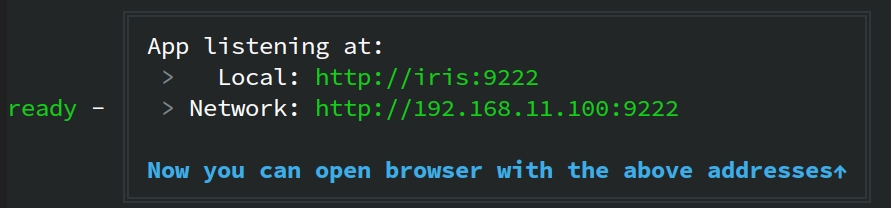
_以下の画面で、システムが正常に起動したことを示します:_
|
||
|
||
|
||
9. 開発が完了したら、RAGFlow のフロントエンド サービスとバックエンド サービスを停止します:
|
||
|
||
```bash
|
||
pkill -f "ragflow_server.py|task_executor.py"
|
||
```
|
||
|
||
## 📚 ドキュメンテーション
|
||
|
||
- [Quickstart](https://ragflow.io/docs/dev/)
|
||
- [Configuration](https://ragflow.io/docs/dev/configurations)
|
||
- [Release notes](https://ragflow.io/docs/dev/release_notes)
|
||
- [User guides](https://ragflow.io/docs/category/user-guides)
|
||
- [Developer guides](https://ragflow.io/docs/category/developer-guides)
|
||
- [References](https://ragflow.io/docs/dev/category/references)
|
||
- [FAQs](https://ragflow.io/docs/dev/faq)
|
||
|
||
## 📜 ロードマップ
|
||
|
||
[RAGFlow ロードマップ 2026](https://github.com/infiniflow/ragflow/issues/12241) を参照
|
||
|
||
## 🏄 コミュニティ
|
||
|
||
- [Discord](https://discord.gg/NjYzJD3GM3)
|
||
- [X](https://x.com/infiniflowai)
|
||
- [GitHub Discussions](https://github.com/orgs/infiniflow/discussions)
|
||
|
||
## 🙌 コントリビュート
|
||
|
||
RAGFlow はオープンソースのコラボレーションによって発展してきました。この精神に基づき、私たちはコミュニティからの多様なコントリビュートを受け入れています。 参加を希望される方は、まず [コントリビューションガイド](https://ragflow.io/docs/dev/contributing)をご覧ください。
|