mirror of
https://github.com/infiniflow/ragflow.git
synced 2026-08-13 20:26:51 +08:00

27 lines
868 B
Markdown
27 lines
868 B
Markdown
---
|
|
sidebar_position: 1
|
|
slug: /use_memory
|
|
sidebar_label: Create Memory
|
|
title: Create Memory
|
|
sidebar_custom_props: {
|
|
categoryIcon: LucideBox
|
|
}
|
|
---
|
|
|
|
# Memory
|
|
|
|
This chapter describes how to create and configure memories in RAGFlow, view and manage messages, and save and retrieve memories in Agents. Memories are used to save conversation content and extraction results generated during Agent execution, helping Agents reuse historical context in subsequent conversations or tasks.
|
|
|
|
|
|
|
|
## Create Memory
|
|
|
|
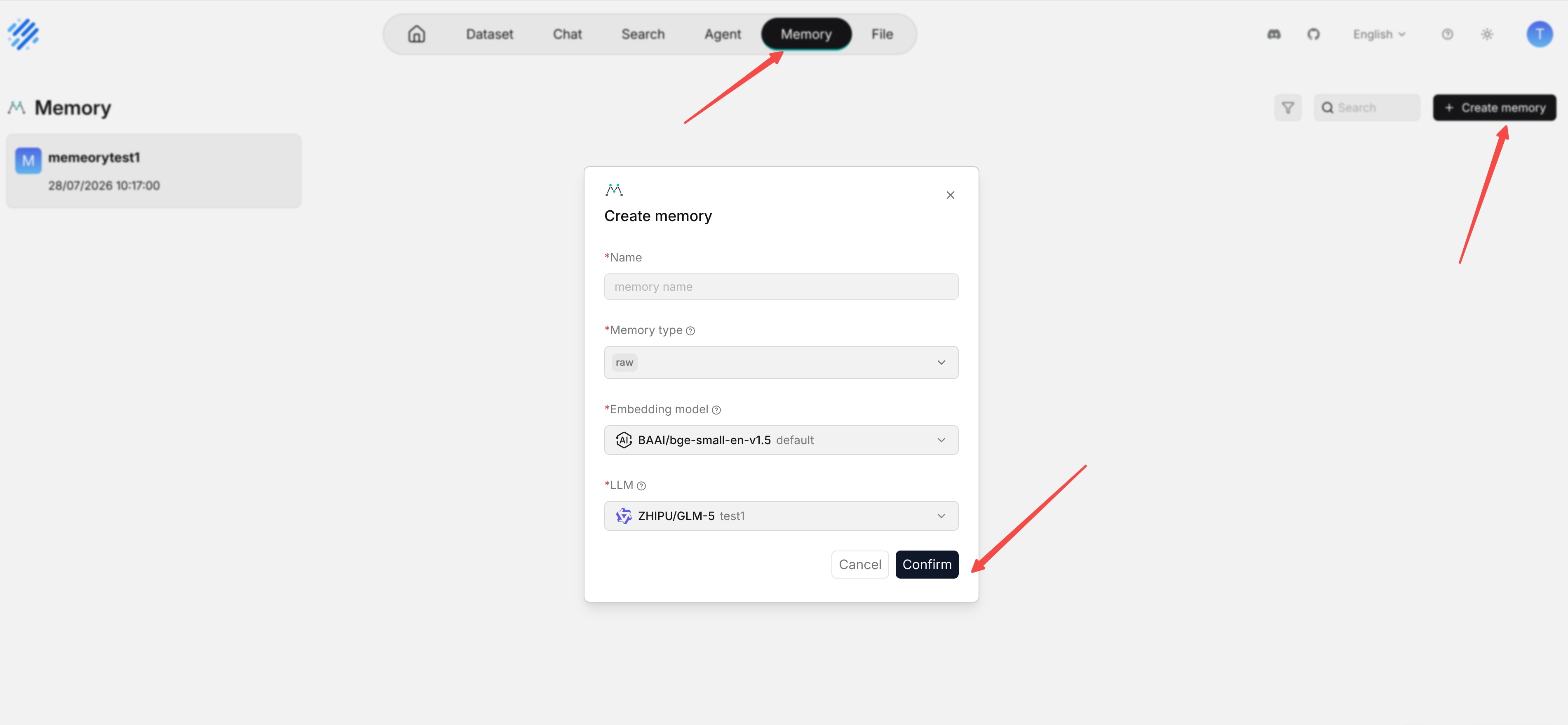
1. Go to the **Memory** page.
|
|
2. Click **Create memory**.
|
|
3. Enter the memory name.
|
|
4. Select the memory type, embedding model, and large language model.
|
|
5. Click **Confirm** to create the memory.
|
|
6. After confirmation, enter the memory list or details page.
|
|
|
|
|