mirror of
https://github.com/infiniflow/ragflow.git
synced 2026-08-01 21:37:33 +08:00
108 lines
5.1 KiB
Markdown
108 lines
5.1 KiB
Markdown

|
---
|
||
|
|
sidebar_position: 3
|
||
|
|
slug: /data_manipulation_components
|
||
|
|
sidebar_custom_props: {
|
||
|
|
categoryIcon: RagAiAgent
|
||
|
|
}
|
||
|
|
---
|
||
|
|
|
||
|
|
# Data Manipulation Components
|
||
|
|
## Code Component
|
||
|
|
The Code component executes Python or JavaScript code for complex data processing, format conversion, calculation, file generation and custom logic.
|
||
|
|
|
||
|
|
Prerequisite: The Code component depends on a secure sandbox environment. The deployment environment needs to install and enable gVisor, RAGFlow sandbox and related environment variables. Restart the service after dependency changes.
|
||
|
|
|
||
|
|
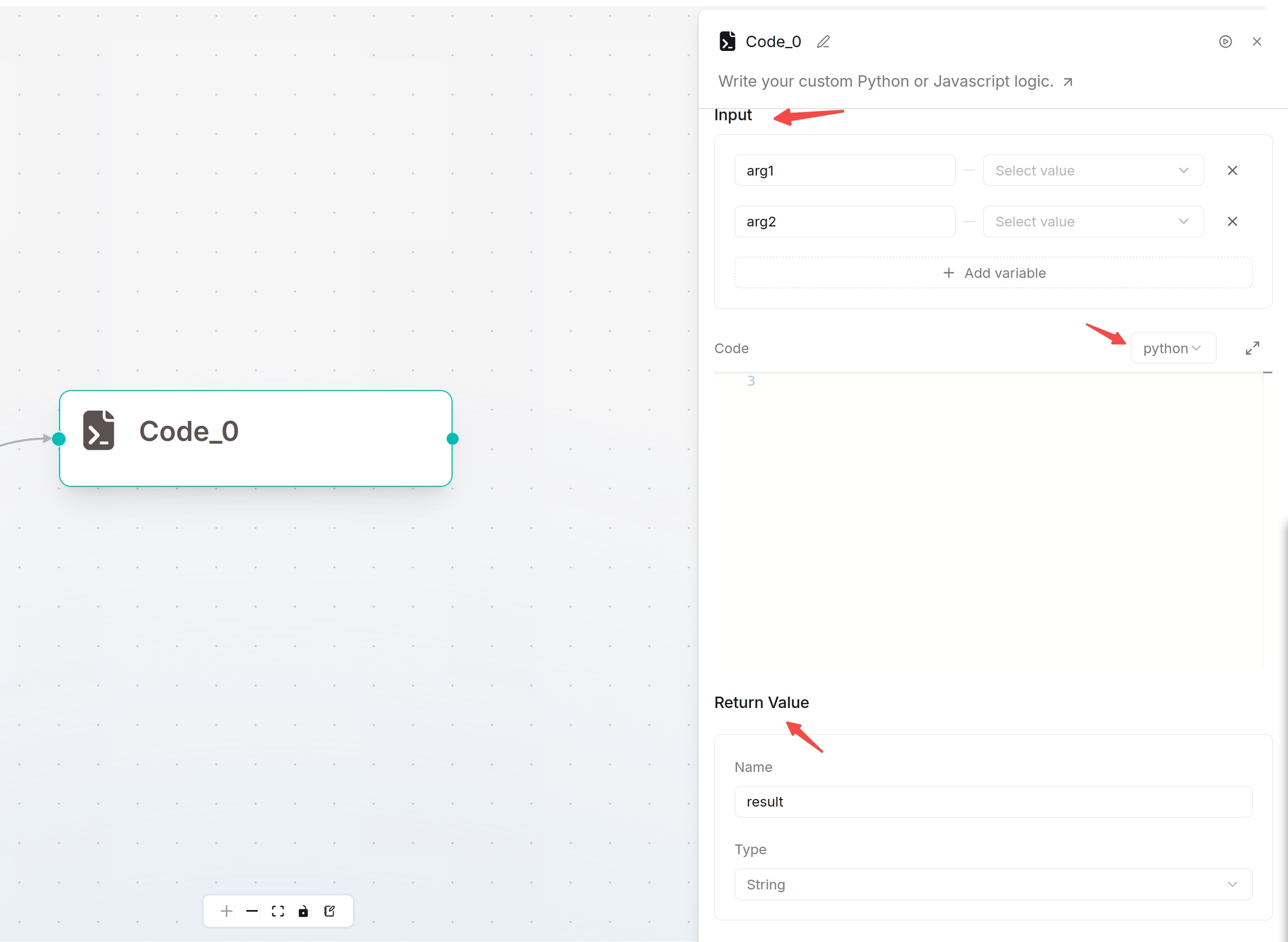
Configuration:
|
||
|
|
1. **Input**: Define parameters passed into code; variables can be directly referenced inside scripts.
|
||
|
|
2. **Code**: Select Python or JavaScript and write business logic.
|
||
|
|
3. **Return Value**: Define output data returned to downstream components.
|
||
|
|
|
||
|
|
|
||
|
|
|
||
|
|
|
||
|
|
## Text Processing Component
|
||
|
|
Text Processing splits or merges text. Used to split long upstream text by separators or combine multiple variables into one template.
|
||
|
|
|
||
|
|
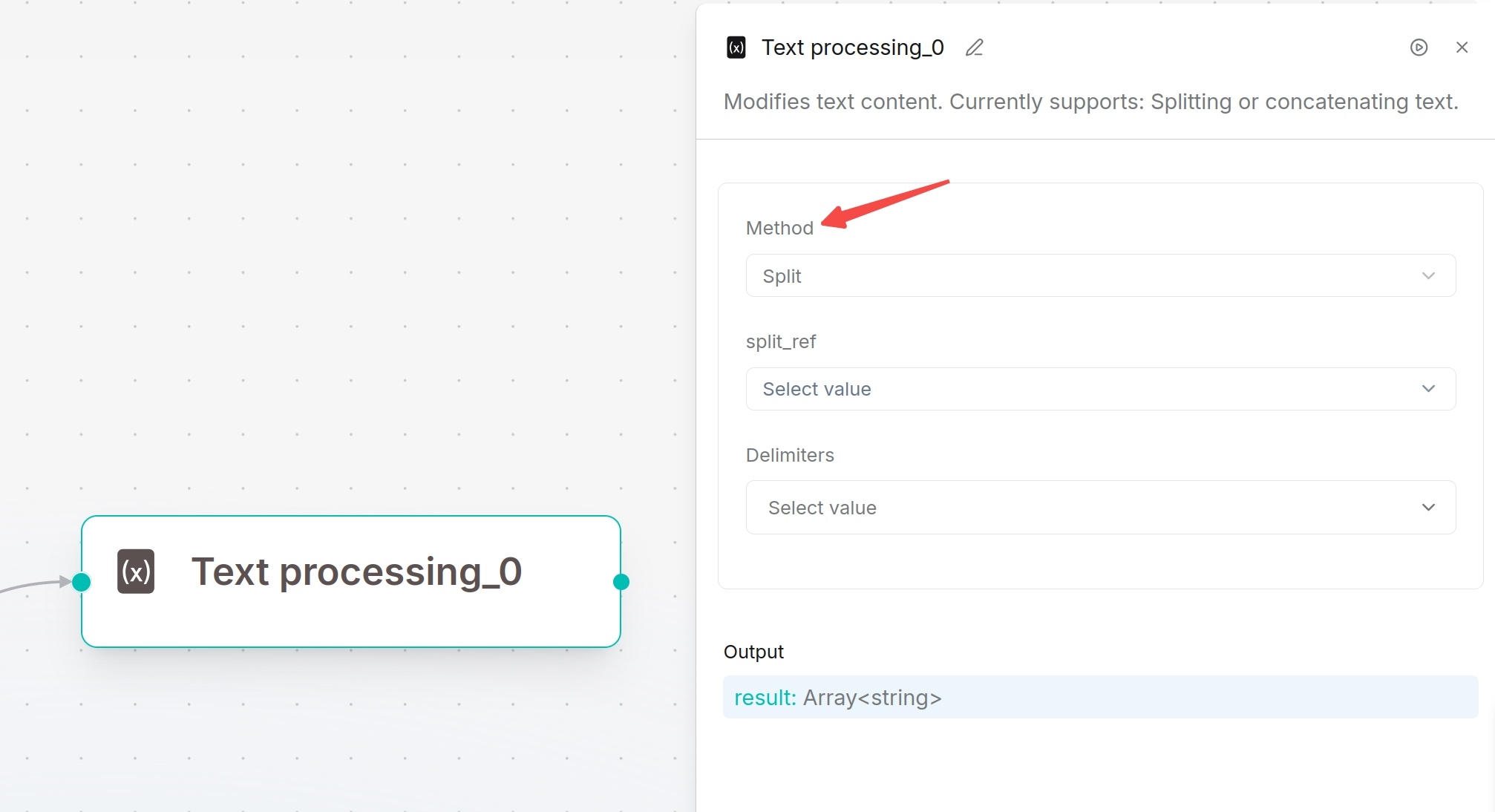
Processing Modes:
|
||
|
|
- **Merge**: Concatenate content sequentially
|
||
|
|
- **Split**: Split text by specified delimiters (comma, line break, space etc.)
|
||
|
|
|
||
|
|
Configure script content with variables inserted via `/`. Output results can be referenced by subsequent nodes.
|
||
|
|
|
||
|
|
|
||
|
|
|
||
|
|
|
||
|
|
## Data Operation Component
|
||
|
|
Data Operation processes structured objects returned by upstream tools, code or database nodes to clean data for downstream usage.
|
||
|
|
|
||
|
|
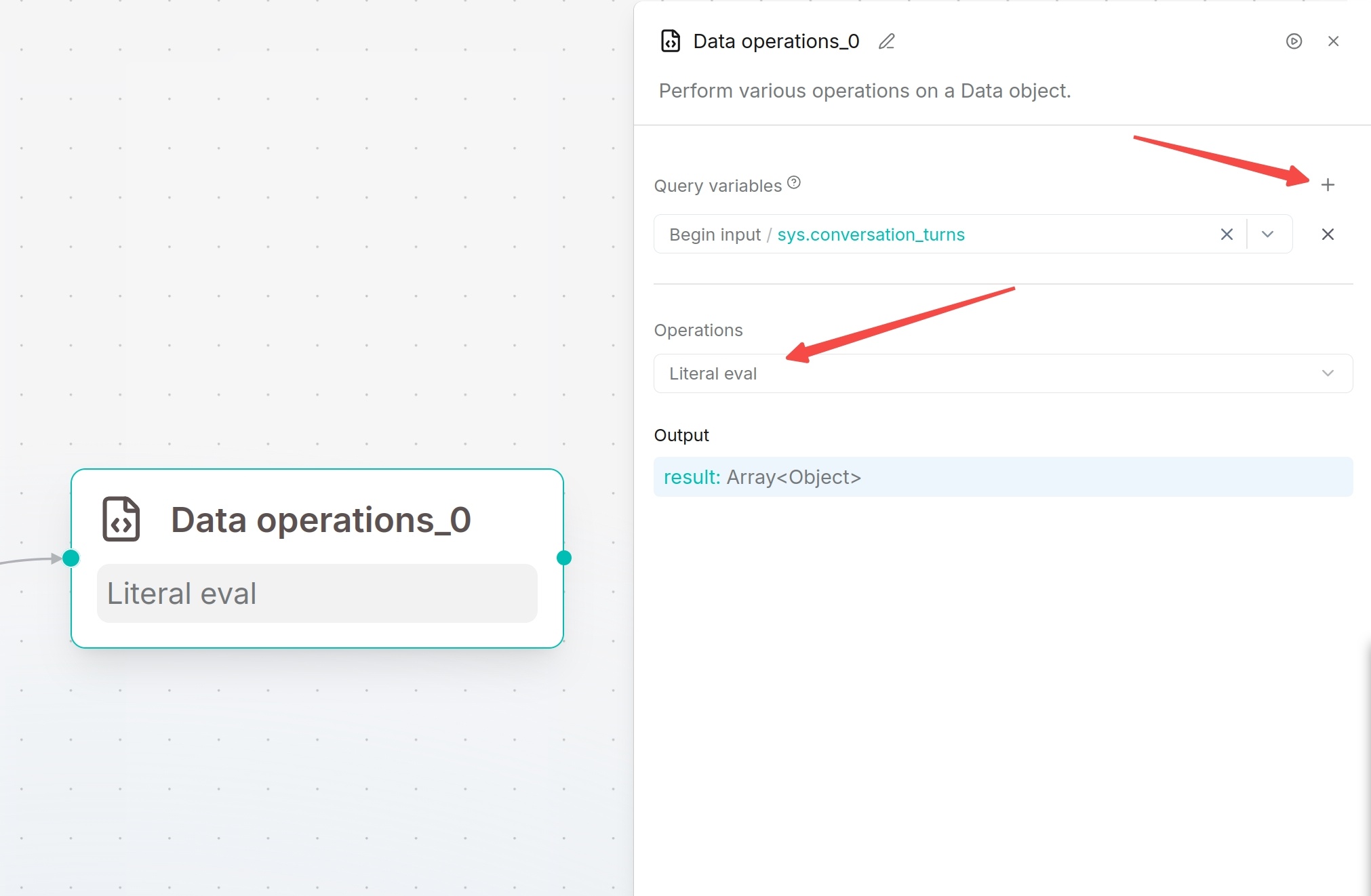
Configuration Steps:
|
||
|
|
1. Add and select the Data Operation component on canvas.
|
||
|
|
2. Select target data variables in Query variables.
|
||
|
|
3. Click `+` to add multiple input variables. Query variables are mandatory.
|
||
|
|
4. Select processing operation in Operations and fill corresponding configurations.
|
||
|
|
5. Save and run tests.
|
||
|
|
|
||
|
|
Output: Processed data stored in variable `result`.
|
||
|
|
|
||
|
|
Supported Operations:
|
||
|
|
| Operation | Function | Scenario |
|
||
|
|
| ---- | ---- | ---- |
|
||
|
|
| Select keys | Keep only specified fields | Extract required fields for downstream nodes |
|
||
|
|
| Literal eval | Convert string-formatted list/dict/bool/number into actual data types | Parse serialized structured strings |
|
||
|
|
| Combine | Merge multiple objects into one | Aggregate outputs from multiple upstream nodes |
|
||
|
|
| Filter values | Filter data matching conditions | Filter array/object collections |
|
||
|
|
| Append or update | Add new fields or overwrite existing field values | Supplement or modify object attributes |
|
||
|
|
| Remove keys | Delete specified fields | Remove unnecessary sensitive or unused fields |
|
||
|
|
| Rename keys | Rename object field keys | Unify field naming standards |
|
||
|
|
|
||
|
|
|
||
|
|
|
||
|
|
|
||
|
|
## Variable Assignor Component
|
||
|
|
Variable Assignor writes or updates variables during workflow execution. It can save upstream results to target variables and support overwrite, clear, append and arithmetic operations for numbers, arrays and objects.
|
||
|
|
|
||
|
|
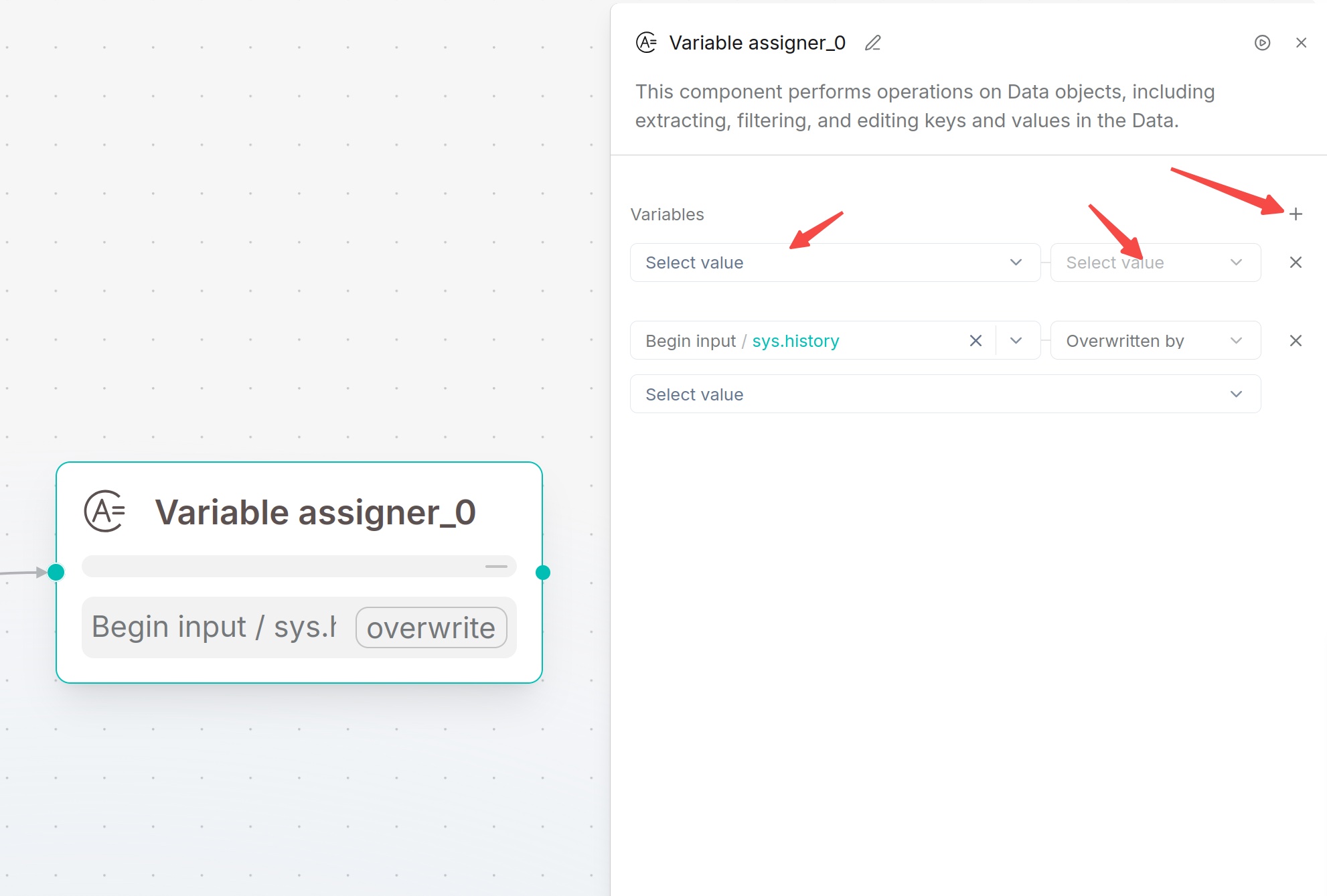
Configuration:
|
||
|
|
Add variable rules. Select target variable, choose operation type, and fill constant or reference variable as value if required. Multiple rules execute sequentially.
|
||
|
|
|
||
|
|
Supported Operations:
|
||
|
|
| Operation | Requires Value | Description |
|
||
|
|
| ---- | ---- | ---- |
|
||
|
|
| Overwritten by | Yes | Overwrite target variable with another variable's value |
|
||
|
|
| Set | Yes | Assign fixed constant value to target variable |
|
||
|
|
| Clear | No | Empty the target variable |
|
||
|
|
|
||
|
|
|
||
|
|
|
||
|
|
|
||
|
|
## List Operation Component
|
||
|
|
List Operation processes array data, supporting element extraction, head/tail fetching, filtering, sorting and deduplication. Suitable for array outputs from Begin, HTTP Request, Code and SQL.
|
||
|
|
|
||
|
|
Configuration:
|
||
|
|
1. Select array variable in Query variables.
|
||
|
|
2. Choose operation in Operations and fill parameters.
|
||
|
|
3. Optional: Enable Strict mode.
|
||
|
|
|
||
|
|
Strict Mode:
|
||
|
|
- Enabled: Return error when input data format is abnormal
|
||
|
|
- Disabled: Handle abnormal data with default tolerance
|
||
|
|
|
||
|
|
Supported Operations:
|
||
|
|
- Nth: Get element at specified index (starting from 0)
|
||
|
|
- Head: Get first N elements
|
||
|
|
- Tail: Get last N elements
|
||
|
|
- Filter: Filter array by conditions
|
||
|
|
- Sort: Sort array by specified field (asc/desc)
|
||
|
|
- Drop duplicates: Remove duplicate entries
|
||
|
|
|
||
|
|
## Variable Aggregator Component
|
||
|
|
Variable Aggregator combines multiple independent variables into one output group for unified reference by downstream nodes. Widely used in multi-branch conditional workflows to collect data from different branches.
|
||
|
|
|
||
|
|
Configuration:
|
||
|
|
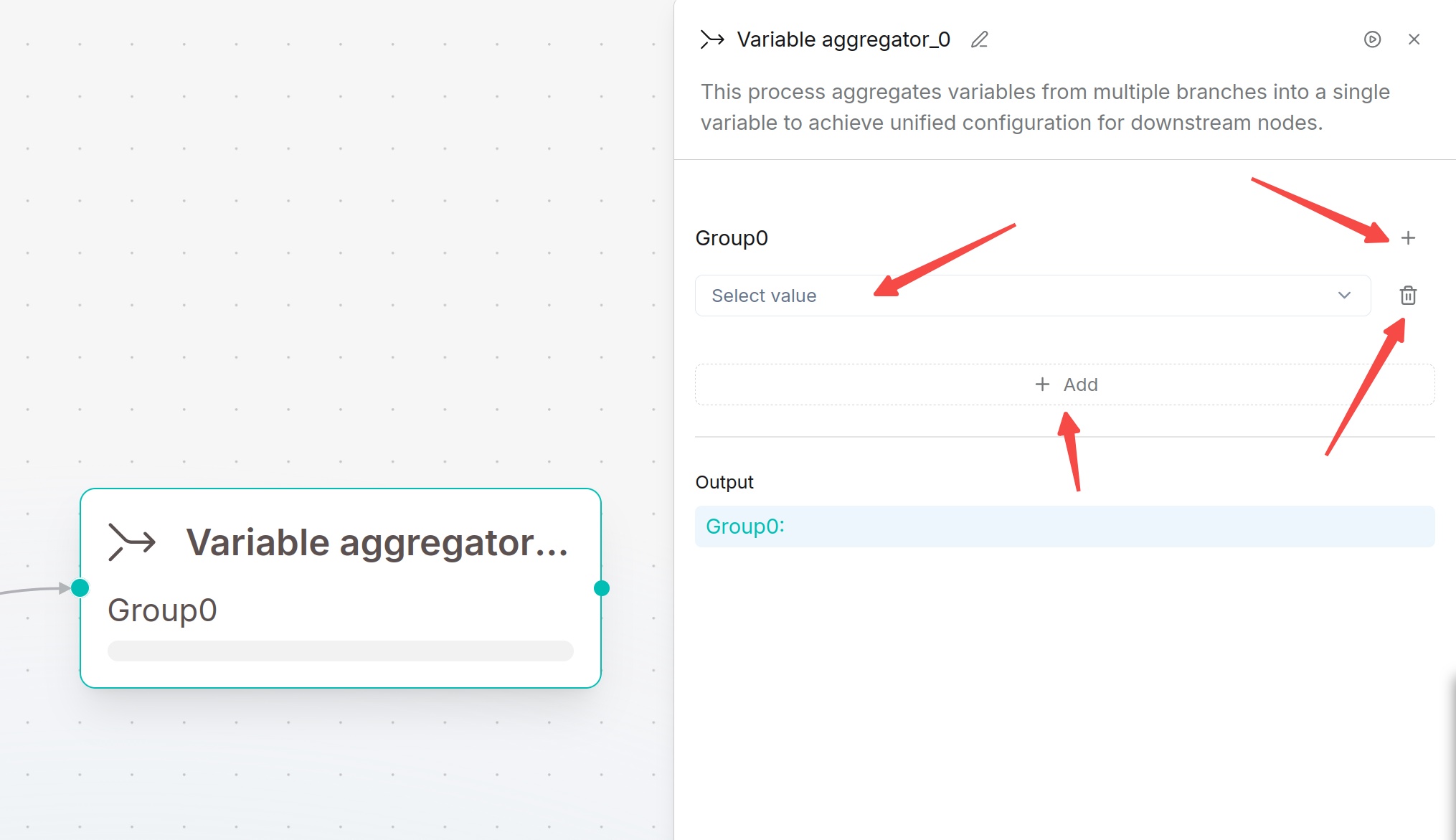
1. Select variables and add into variable groups (default Group0).
|
||
|
|
2. Click `+` to create new variable groups; delete groups via remove button.
|
||
|
|
3. Save configuration and run tests.
|
||
|
|
|
||
|
|
Output: Variables inside each group can be referenced via group name such as `Group0`.
|
||
|
|
|
||
|
|
|