mirror of
https://github.com/jackwener/OpenCLI.git
synced 2026-09-14 18:25:42 +08:00
 jackwener
283 lines
14 KiB
Markdown
283 lines
14 KiB
Markdown
# OpenCLI
|
|
|
|
> **Make any website, Electron App, or Local Tool your CLI.**
|
|
> Zero risk · Reuse Chrome/Chromium login · AI-powered discovery · Universal CLI Hub
|
|
|
|
[](./README.zh-CN.md)
|
|
[](https://www.npmjs.com/package/@jackwener/opencli)
|
|
[](https://nodejs.org)
|
|
[](./LICENSE)
|
|
|
|
A CLI tool that turns **any website**, **Electron app**, or **local CLI tool** into a command-line interface — Bilibili, Zhihu, 小红书, Twitter/X, Reddit, YouTube, Antigravity, `gh`, `docker`, and [many more](#built-in-commands) — powered by browser session reuse and AI-native discovery.
|
|
|
|
**Built for AI Agents** — Load the [`opencli-operate` skill](./skills/opencli-operate/SKILL.md) to give any AI agent (Claude Code, Cursor) direct browser control. Operate any website, then crystallize those interactions into reusable CLI commands. Configure `opencli list` in your `AGENT.md` or `.cursorrules` so the AI auto-discovers all available tools.
|
|
|
|
**CLI Hub** — Register any local CLI (`opencli register mycli`) so AI agents can discover and call it alongside built-in commands. Auto-installs missing tools via your package manager (e.g. if `gh` isn't installed, `opencli gh ...` runs `brew install gh` first then re-executes seamlessly).
|
|
|
|
**CLI for Electron Apps** — Turn any Electron application into a CLI tool. Recombine, script, and extend apps like Antigravity Ultra from the terminal. AI agents can now control other AI apps natively.
|
|
|
|
---
|
|
|
|
## Highlights
|
|
|
|
- **CLI All Electron** — CLI-ify apps like Antigravity Ultra! Now AI can control itself natively.
|
|
- **Browser Automation** — `operate` gives AI agents direct browser control: click, type, extract, screenshot — any interaction, fully scriptable.
|
|
- **Website → CLI** — Turn any website into a deterministic CLI: 70+ pre-built adapters, or crystallize your own with `opencli record`.
|
|
- **Account-safe** — Reuses Chrome/Chromium logged-in state; your credentials never leave the browser.
|
|
- **Anti-detection built-in** — Patches `navigator.webdriver`, stubs `window.chrome`, fakes plugin lists, cleans ChromeDriver/Playwright globals, and strips CDP frames from Error stack traces. Extensive anti-fingerprinting and risk-control evasion measures baked in at every layer.
|
|
- **AI Agent ready** — `explore` discovers APIs, `synthesize` generates adapters, `cascade` finds auth strategies, `operate` controls the browser directly.
|
|
- **External CLI Hub** — Discover, auto-install, and passthrough commands to any external CLI (gh, obsidian, docker, etc). Zero setup.
|
|
- **Self-healing setup** — `opencli doctor` diagnoses and auto-starts the daemon, extension, and live browser connectivity.
|
|
- **Dynamic Loader** — Simply drop `.ts` or `.yaml` adapters into the `clis/` folder for auto-registration.
|
|
- **Zero LLM cost** — No tokens consumed at runtime. Run 10,000 times and pay nothing.
|
|
- **Deterministic** — Same command, same output schema, every time. Pipeable, scriptable, CI-friendly.
|
|
- **Broad coverage** — 73+ sites across global and Chinese platforms (Bilibili, Zhihu, Xiaohongshu, Reddit, HackerNews, and more), plus desktop Electron apps via CDP.
|
|
|
|
---
|
|
|
|
## Quick Start
|
|
|
|
### 1. Install Browser Bridge Extension
|
|
|
|
> OpenCLI connects to your browser through a lightweight **Browser Bridge** Chrome/Chromium extension + micro-daemon (zero config, auto-start).
|
|
|
|
1. Go to the GitHub [Releases page](https://github.com/jackwener/opencli/releases) and download the latest `opencli-extension.zip`.
|
|
2. Unzip the file and open `chrome://extensions`, enable **Developer mode** (top-right toggle).
|
|
3. Click **Load unpacked** and select the unzipped folder.
|
|
|
|
### 2. Install OpenCLI
|
|
|
|
**Install via npm (recommended)**
|
|
|
|
```bash
|
|
npm install -g @jackwener/opencli
|
|
```
|
|
|
|
### 3. Verify & Try
|
|
|
|
```bash
|
|
opencli doctor # Check extension + daemon connectivity
|
|
opencli daemon status # Check daemon state (PID, uptime, memory)
|
|
```
|
|
|
|
**Try it out:**
|
|
|
|
```bash
|
|
opencli list # See all commands
|
|
opencli hackernews top --limit 5 # Public API, no browser needed
|
|
opencli bilibili hot --limit 5 # Browser command (requires Extension)
|
|
```
|
|
|
|
### 4. Browser Automation — Make Websites Accessible for AI Agents
|
|
|
|
Point your AI agent (Claude Code, Cursor) to [`skills/opencli-operate/SKILL.md`](./skills/opencli-operate/SKILL.md). It has everything needed — full command reference, examples, and workflow.
|
|
|
|
Available commands: `open`, `state`, `click`, `type`, `select`, `keys`, `wait`, `get`, `screenshot`, `scroll`, `back`, `eval`, `network`, `init`, `verify`, `close`.
|
|
|
|
### Update
|
|
|
|
```bash
|
|
npm install -g @jackwener/opencli@latest
|
|
```
|
|
|
|
### Install AI Skills
|
|
|
|
OpenCLI provides [skills](./skills/) for AI agents (Claude Code, etc.):
|
|
|
|
```bash
|
|
# Install all OpenCLI skills
|
|
npx skills add jackwener/opencli
|
|
|
|
# Or install specific skills
|
|
npx skills add jackwener/opencli --skill opencli-usage # Command reference
|
|
npx skills add jackwener/opencli --skill opencli-operate # Browser automation for AI agents
|
|
npx skills add jackwener/opencli --skill opencli-explorer # Adapter development guide
|
|
npx skills add jackwener/opencli --skill opencli-oneshot # Quick command reference
|
|
```
|
|
|
|
---
|
|
|
|
### For Developers
|
|
|
|
**Install from source**
|
|
|
|
```bash
|
|
git clone git@github.com:jackwener/opencli.git && cd opencli && npm install && npm run build && npm link
|
|
```
|
|
|
|
**Load Source Browser Bridge Extension**
|
|
|
|
1. Open `chrome://extensions` and enable **Developer mode** (top-right toggle).
|
|
2. Click **Load unpacked** and select the `extension/` directory from this repository.
|
|
|
|
---
|
|
|
|
## Prerequisites
|
|
|
|
- **Node.js**: >= 20.0.0 (or **Bun** >= 1.0)
|
|
- **Chrome or Chromium** running **and logged into the target site** (e.g. bilibili.com, zhihu.com, xiaohongshu.com, goofish.com).
|
|
|
|
> **⚠️ Important**: Browser commands reuse your Chrome/Chromium login session. You must be logged into the target website in Chrome or Chromium before running commands. If you get empty data or errors, check your login status first.
|
|
|
|
## Built-in Commands
|
|
|
|
| Site | Commands |
|
|
|------|----------|
|
|
| **xiaohongshu** | `search` `note` `comments` `feed` `user` `download` `publish` `notifications` `creator-notes` `creator-notes-summary` `creator-note-detail` `creator-profile` `creator-stats` |
|
|
| **bilibili** | `hot` `search` `history` `feed` `ranking` `download` `comments` `dynamic` `favorite` `following` `me` `subtitle` `user-videos` |
|
|
| **tieba** | `hot` `posts` `search` `read` |
|
|
| **twitter** | `trending` `search` `timeline` `bookmarks` `post` `download` `profile` `article` `like` `likes` `notifications` `reply` `reply-dm` `thread` `follow` `unfollow` `followers` `following` `block` `unblock` `bookmark` `unbookmark` `delete` `hide-reply` `accept` |
|
|
| **reddit** | `hot` `frontpage` `popular` `search` `subreddit` `user` `user-posts` `user-comments` `read` `save` `saved` `subscribe` `upvote` `upvoted` `comment` |
|
|
| **amazon** | `bestsellers` `search` `product` `offer` `discussion` |
|
|
| **gemini** | `new` `ask` `image` |
|
|
| **yuanbao** | `new` `ask` |
|
|
| **notebooklm** | `status` `list` `open` `select` `current` `get` `metadata` `source-list` `source-get` `source-fulltext` `source-guide` `history` `note-list` `notes-list` `notes-get` `summary` |
|
|
| **spotify** | `auth` `status` `play` `pause` `next` `prev` `volume` `search` `queue` `shuffle` `repeat` |
|
|
| **xianyu** | `search` `item` `chat` |
|
|
|
|
73+ adapters in total — **[→ see all supported sites & commands](./docs/adapters/index.md)**
|
|
|
|
## CLI Hub
|
|
|
|
OpenCLI acts as a universal hub for your existing command-line tools — unified discovery, pure passthrough execution, and auto-install (if a tool isn't installed, OpenCLI runs `brew install <tool>` automatically before re-running the command).
|
|
|
|
| External CLI | Description | Example |
|
|
|--------------|-------------|---------|
|
|
| **gh** | GitHub CLI | `opencli gh pr list --limit 5` |
|
|
| **obsidian** | Obsidian vault management | `opencli obsidian search query="AI"` |
|
|
| **docker** | Docker | `opencli docker ps` |
|
|
| **lark-cli** | Lark/Feishu — messages, docs, calendar, tasks, 200+ commands | `opencli lark-cli calendar +agenda` |
|
|
| **dingtalk** | DingTalk — cross-platform CLI for DingTalk's full suite, designed for humans and AI agents | `opencli dingtalk msg send --to user "hello"` |
|
|
| **wecom** | WeCom/企业微信 — CLI for WeCom open platform, for humans and AI agents | `opencli wecom msg send --to user "hello"` |
|
|
| **vercel** | Vercel — deploy projects, manage domains, env vars, logs | `opencli vercel deploy --prod` |
|
|
|
|
**Register your own** — add any local CLI so AI agents can discover it via `opencli list`:
|
|
|
|
```bash
|
|
opencli register mycli
|
|
```
|
|
|
|
### Desktop App Adapters
|
|
|
|
Control Electron desktop apps directly from the terminal. Each adapter has its own detailed documentation:
|
|
|
|
| App | Description | Doc |
|
|
|-----|-------------|-----|
|
|
| **Cursor** | Control Cursor IDE — Composer, chat, code extraction | [Doc](./docs/adapters/desktop/cursor.md) |
|
|
| **Codex** | Drive OpenAI Codex CLI agent headlessly | [Doc](./docs/adapters/desktop/codex.md) |
|
|
| **Antigravity** | Control Antigravity Ultra from terminal | [Doc](./docs/adapters/desktop/antigravity.md) |
|
|
| **ChatGPT** | Automate ChatGPT macOS desktop app | [Doc](./docs/adapters/desktop/chatgpt.md) |
|
|
| **ChatWise** | Multi-LLM client (GPT-4, Claude, Gemini) | [Doc](./docs/adapters/desktop/chatwise.md) |
|
|
| **Notion** | Search, read, write Notion pages | [Doc](./docs/adapters/desktop/notion.md) |
|
|
| **Discord** | Discord Desktop — messages, channels, servers | [Doc](./docs/adapters/desktop/discord.md) |
|
|
| **Doubao** | Control Doubao AI desktop app via CDP | [Doc](./docs/adapters/desktop/doubao-app.md) |
|
|
|
|
To add a new Electron app, start with [docs/guide/electron-app-cli.md](./docs/guide/electron-app-cli.md).
|
|
|
|
## Download Support
|
|
|
|
OpenCLI supports downloading images, videos, and articles from supported platforms.
|
|
|
|
| Platform | Content Types | Notes |
|
|
|----------|---------------|-------|
|
|
| **xiaohongshu** | Images, Videos | Downloads all media from a note |
|
|
| **bilibili** | Videos | Requires `yt-dlp` installed |
|
|
| **twitter** | Images, Videos | From user media tab or single tweet |
|
|
| **douban** | Images | Poster / still image lists |
|
|
| **pixiv** | Images | Original-quality illustrations, multi-page |
|
|
| **zhihu** | Articles (Markdown) | Exports with optional image download |
|
|
| **weixin** | Articles (Markdown) | WeChat Official Account articles |
|
|
|
|
For video downloads, install `yt-dlp` first: `brew install yt-dlp`
|
|
|
|
```bash
|
|
opencli xiaohongshu download abc123 --output ./xhs
|
|
opencli bilibili download BV1xxx --output ./bilibili
|
|
opencli twitter download elonmusk --limit 20 --output ./twitter
|
|
```
|
|
|
|
## Output Formats
|
|
|
|
All built-in commands support `--format` / `-f` with `table` (default), `json`, `yaml`, `md`, and `csv`.
|
|
|
|
```bash
|
|
opencli bilibili hot -f json # Pipe to jq or LLMs
|
|
opencli bilibili hot -f csv # Spreadsheet-friendly
|
|
opencli bilibili hot -v # Verbose: show pipeline debug steps
|
|
```
|
|
|
|
## Exit Codes
|
|
|
|
opencli follows Unix `sysexits.h` conventions so it integrates naturally with shell pipelines and CI scripts:
|
|
|
|
| Code | Meaning | When |
|
|
|------|---------|------|
|
|
| `0` | Success | Command completed normally |
|
|
| `1` | Generic error | Unexpected / unclassified failure |
|
|
| `2` | Usage error | Bad arguments or unknown command |
|
|
| `66` | Empty result | No data returned (`EX_NOINPUT`) |
|
|
| `69` | Service unavailable | Browser Bridge not connected (`EX_UNAVAILABLE`) |
|
|
| `75` | Temporary failure | Command timed out — retry (`EX_TEMPFAIL`) |
|
|
| `77` | Auth required | Not logged in to target site (`EX_NOPERM`) |
|
|
| `78` | Config error | Missing credentials or bad config (`EX_CONFIG`) |
|
|
| `130` | Interrupted | Ctrl-C / SIGINT |
|
|
|
|
```bash
|
|
opencli spotify status || echo "exit $?" # 69 if browser not running
|
|
opencli github issues 2>/dev/null
|
|
[ $? -eq 77 ] && opencli github auth # auto-auth if not logged in
|
|
```
|
|
|
|
## Plugins
|
|
|
|
Extend OpenCLI with community-contributed adapters:
|
|
|
|
```bash
|
|
opencli plugin install github:user/opencli-plugin-my-tool
|
|
opencli plugin list
|
|
opencli plugin update --all
|
|
opencli plugin uninstall my-tool
|
|
```
|
|
|
|
| Plugin | Type | Description |
|
|
|--------|------|-------------|
|
|
| [opencli-plugin-github-trending](https://github.com/ByteYue/opencli-plugin-github-trending) | YAML | GitHub Trending repositories |
|
|
| [opencli-plugin-hot-digest](https://github.com/ByteYue/opencli-plugin-hot-digest) | TS | Multi-platform trending aggregator |
|
|
| [opencli-plugin-juejin](https://github.com/Astro-Han/opencli-plugin-juejin) | YAML | 稀土掘金 (Juejin) hot articles |
|
|
| [opencli-plugin-vk](https://github.com/flobo3/opencli-plugin-vk) | TS | VK (VKontakte) wall, feed, and search |
|
|
|
|
See [Plugins Guide](./docs/guide/plugins.md) for creating your own plugin.
|
|
|
|
## For AI Agents (Developer Guide)
|
|
|
|
> **Quick mode**: To generate a single command for a specific page URL, see [opencli-oneshot skill](./skills/opencli-oneshot/SKILL.md) — just a URL + one-line goal, 4 steps done.
|
|
|
|
> **Full mode**: Before writing any adapter code, read [opencli-explorer skill](./skills/opencli-explorer/SKILL.md). It contains the complete browser exploration workflow, the 5-tier authentication strategy decision tree, and debugging guide.
|
|
|
|
```bash
|
|
opencli explore https://example.com --site mysite # Discover APIs + capabilities
|
|
opencli synthesize mysite # Generate YAML adapters
|
|
opencli generate https://example.com --goal "hot" # One-shot: explore → synthesize → register
|
|
opencli cascade https://api.example.com/data # Auto-probe: PUBLIC → COOKIE → HEADER
|
|
```
|
|
|
|
## Testing
|
|
|
|
See **[TESTING.md](./TESTING.md)** for how to run and write tests.
|
|
|
|
## Troubleshooting
|
|
|
|
- **"Extension not connected"** — Ensure the Browser Bridge extension is installed and **enabled** in `chrome://extensions` in Chrome or Chromium.
|
|
- **"attach failed: Cannot access a chrome-extension:// URL"** — Another extension may be interfering. Try disabling other extensions temporarily.
|
|
- **Empty data or 'Unauthorized' error** — Your Chrome/Chromium login session may have expired. Navigate to the target site and log in again.
|
|
- **Node API errors** — Ensure Node.js >= 20. Some dependencies require modern Node APIs.
|
|
- **Daemon issues** — Check status: `curl localhost:19825/status` · View logs: `curl localhost:19825/logs`
|
|
|
|
## Star History
|
|
|
|
[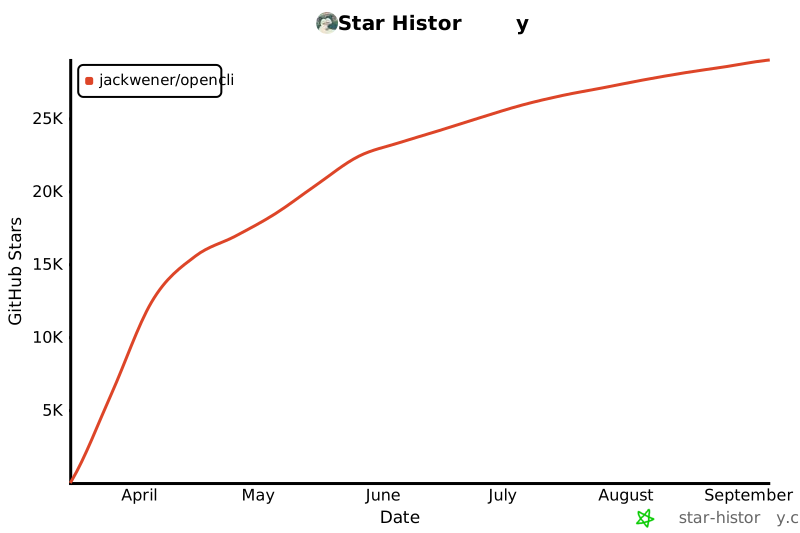](https://star-history.com/#jackwener/opencli&Date)
|
|
|
|
## License
|
|
|
|
[Apache-2.0](./LICENSE)
|