mirror of
https://github.com/google/adk-docs.git
synced 2026-09-14 16:16:59 +08:00
 Jeremy Silva
b3c71d1447
Jeremy Silva
b3c71d1447
* Add Freeplay to observability page

Add details on the Freeplay <> Google ADK integration

* Update freeplay.md

Making requested changes

* Update freeplay.md

Add links at the bottom

* Update mkdocs.yml

Add Freeplay to observability section

* Update docs/observability/freeplay.md

* Update mkdocs.yml

Maintain alphabetical ordering

---------

Co-authored-by: Kristopher Overholt <koverholt@google.com>
191 lines
6.8 KiB
Markdown
191 lines
6.8 KiB
Markdown
# Agent Observability and Evaluation with Freeplay
|
|
|
|
[Freeplay](https://freeplay.ai/) provides an end-to-end workflow for building
|
|
and optimizing AI agents, and it can be integrated with ADK. With Freeplay your
|
|
whole team can easily collaborate to iterate on agent instructions (prompts),
|
|
experiment with and compare different models and agent changes, run evals both
|
|
offline and online to measure quality, monitor production, and review data by
|
|
hand.
|
|
|
|
Key benefits of Freeplay:
|
|
|
|
* **Simple observability** - focused on agents, LLM calls and tool calls for easy human review
|
|
* **Online evals/automated scorers** - for error detection in production
|
|
* **Offline evals and experiment comparison** - to test changes before deploying
|
|
* **Prompt management** - supports pushing changes straight from the Freeplay playground to code
|
|
* **Human review workflow** - for collaboration on error analysis and data annotation
|
|
* **Powerful UI** - makes it possible for domain experts to collaborate closely with engineers
|
|
|
|
Freeplay and ADK complement one another. ADK gives you a powerful and expressive
|
|
agent orchestration framework while Freeplay plugs in for observability, prompt
|
|
management, evaluation and testing. Once you integrate with Freeplay, you can
|
|
update prompts and evals from the Freeplay UI or from code, so that anyone on
|
|
your team can contribute.
|
|
|
|
[Click here](https://www.loom.com/share/82f41ffde94949beb941cb191f53c3ec?sid=997aff3c-daa3-40ab-93a9-fdaf87ea2ea1) to see a demo.
|
|
|
|
## Getting Started
|
|
|
|
Below is a guide for getting started with Freeplay and ADK. You can also find a
|
|
full sample ADK agent repo
|
|
[here](https://github.com/228Labs/freeplay-google-demo).
|
|
|
|
### Create a Freeplay Account
|
|
|
|
Sign up for a free [Freeplay account](https://freeplay.ai/signup).
|
|
|
|
After creating an account, you can define the following environment variables:
|
|
|
|
```
|
|
FREEPLAY_PROJECT_ID=
|
|
FREEPLAY_API_KEY=
|
|
FREEPLAY_API_URL=
|
|
```
|
|
|
|
### Use Freeplay ADK Library
|
|
|
|
Install the Freeplay ADK library:
|
|
|
|
```
|
|
pip install freeplay-python-adk
|
|
```
|
|
|
|
Freeplay will automatically capture OTel logs from your ADK application when
|
|
you initialize observability:
|
|
|
|
```python
|
|
from freeplay_python_adk.client import FreeplayADK
|
|
FreeplayADK.initialize_observability()
|
|
```
|
|
|
|
You'll also want to pass in the Freeplay plugin to your App:
|
|
|
|
```python
|
|
from app.agent import root_agent
|
|
from freeplay_python_adk.freeplay_observability_plugin import FreeplayObservabilityPlugin
|
|
from google.adk.runners import App
|
|
|
|
app = App(
|
|
name="app",
|
|
root_agent=root_agent,
|
|
plugins=[FreeplayObservabilityPlugin()],
|
|
)
|
|
|
|
__all__ = ["app"]
|
|
```
|
|
|
|
You can now use ADK as you normally would, and you will see logs flowing to
|
|
Freeplay in the Observability section.
|
|
|
|
## Observability
|
|
|
|
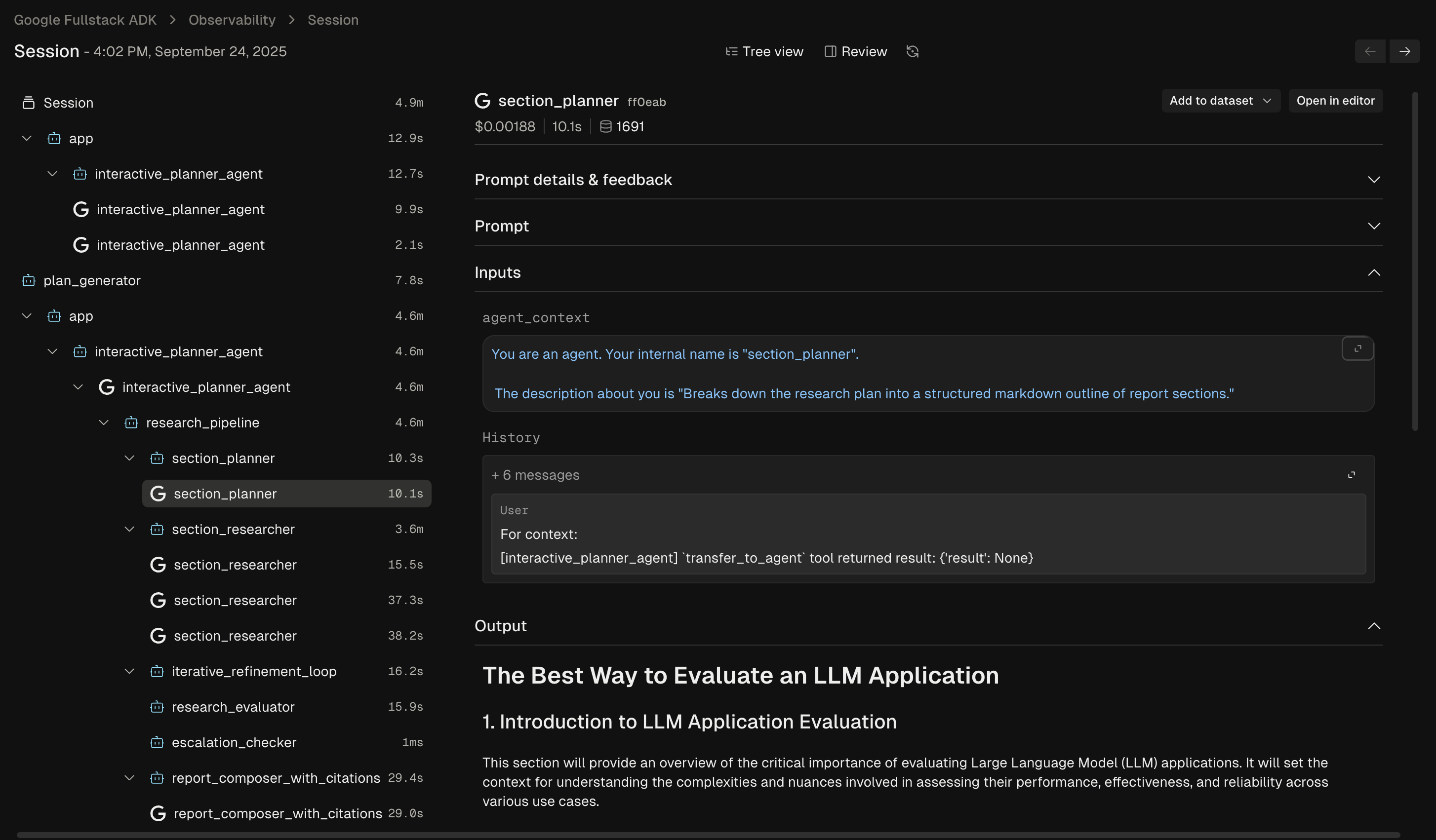
Freeplay's Observability feature gives you a clear view into how your agent is
|
|
behaving in production. You can dig into to individual agent traces to
|
|
understand each step and diagnose issues:
|
|
|
|
|
|
|
|
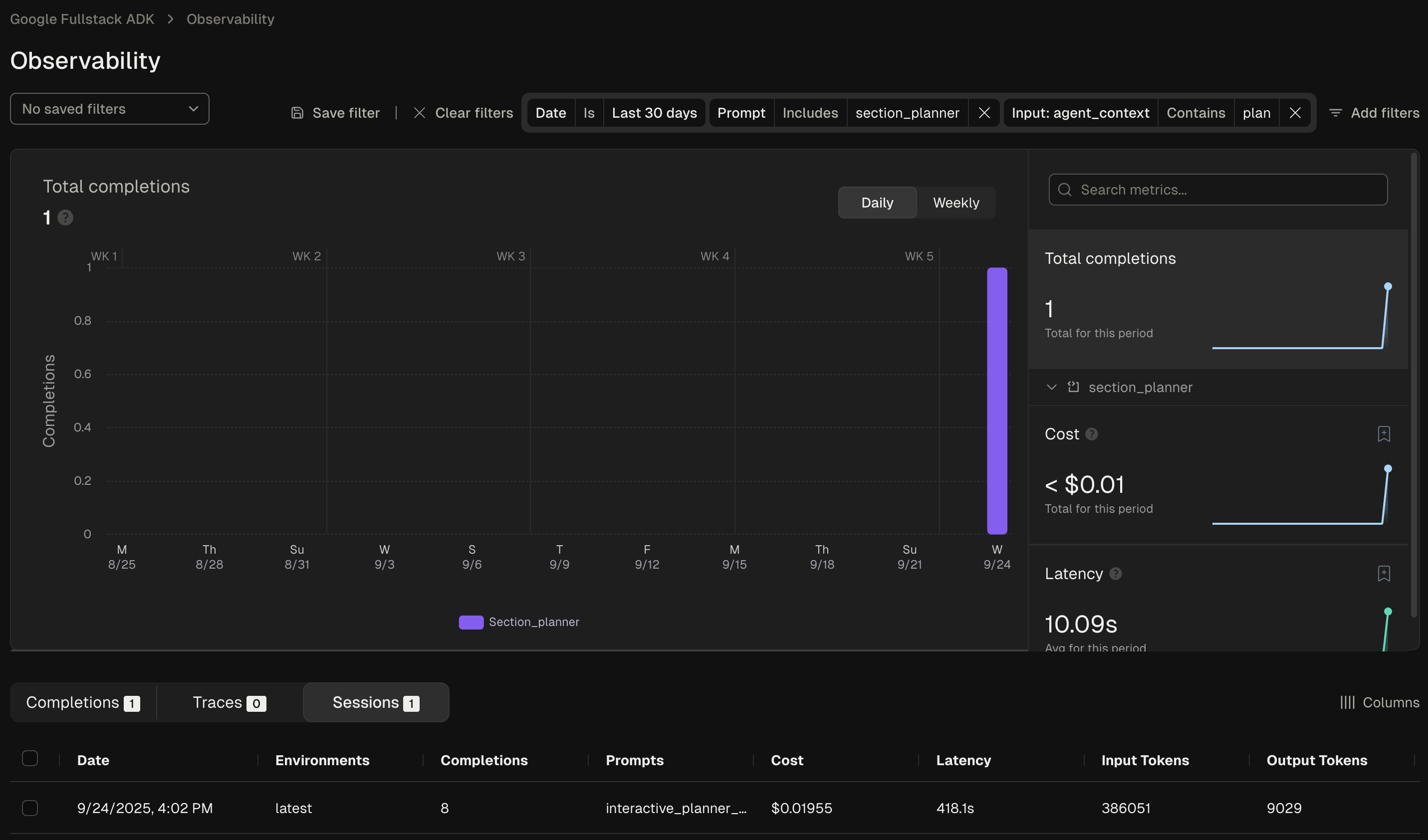
You can also use Freeplay's filtering functionality to search and filter the
|
|
data across any segment of interest:
|
|
|
|
|
|
|
|
## Prompt Management (optional)
|
|
|
|
Freeplay offers
|
|
[native prompt management](https://docs.freeplay.ai/docs/managing-prompts),
|
|
which simplifies the process of version and testing different prompt versions.
|
|
It allows you to experiment with changes to ADK agent instructions in the
|
|
Freeplay UI, test different models, and push updates straight to your code,
|
|
similar to a feature flag.
|
|
|
|
To leverage Freeplay's prompt management capabilities alongside ADK, you'll want
|
|
to use the Freeplay ADK agent wrapper. `FreeplayLLMAgent` extends ADK's base
|
|
`LlmAgent` class, so instead of having to hard code your prompts as agent
|
|
instructions, you can version prompts in the Freeplay application.
|
|
|
|
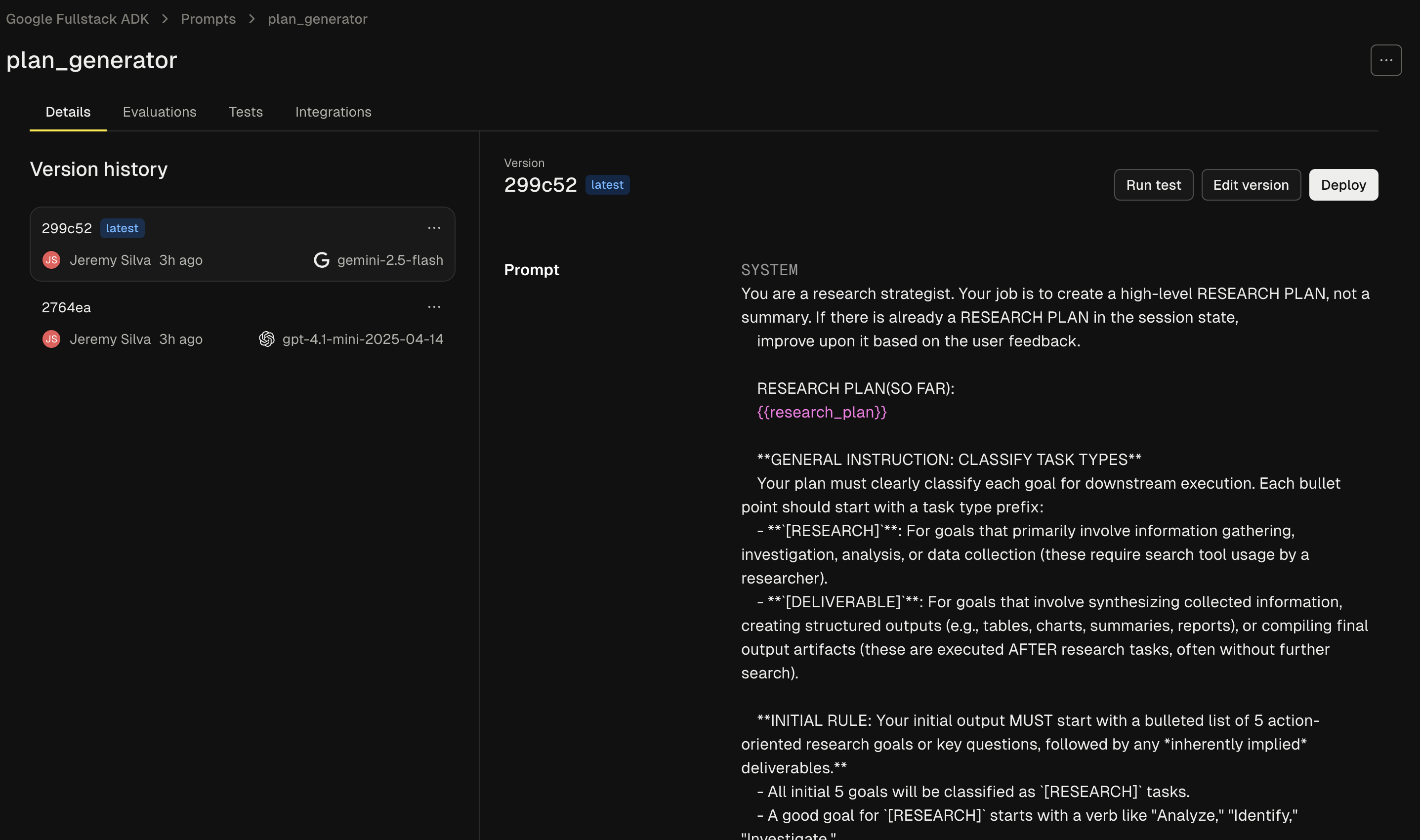
First define a prompt in Freeplay by going to Prompts -> Create prompt template:
|
|
|
|
|
|
|
|
When creating your prompt template you'll need to add 3 elements, as described
|
|
in the following sections:
|
|
|
|
### System Message
|
|
|
|
This corresponds to the "instructions" section in your code.
|
|
|
|
### Agent Context Variable
|
|
|
|
Adding the following to the bottom of your system message will create a variable
|
|
for the ongoing agent context to be passed through:
|
|
|
|
```python
|
|
{{agent_context}}
|
|
```
|
|
|
|
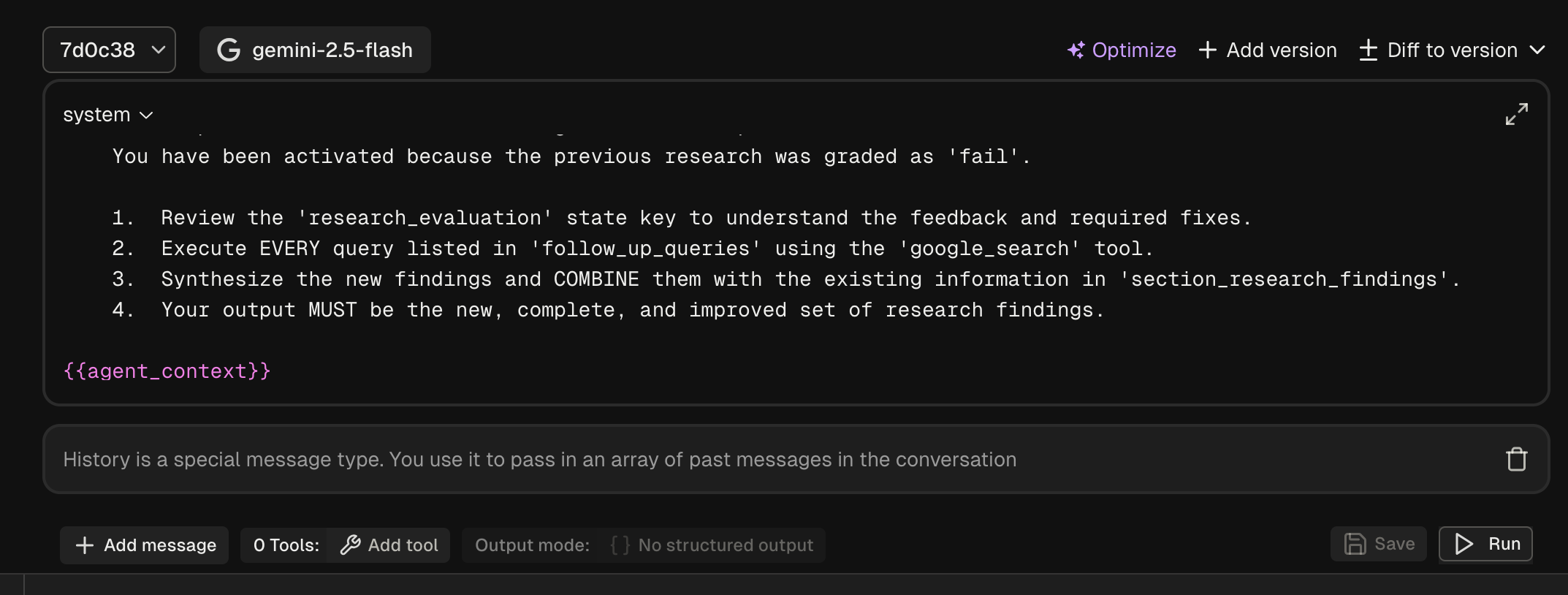
### History Block
|
|
|
|
Click new message and change the role to 'history'. This will ensure the past
|
|
messages are passed through when present.
|
|
|
|
|
|
|
|
Now in your code you can use the ```FreeplayLLMAgent```:
|
|
|
|
```python
|
|
from freeplay_python_adk.client import FreeplayADK
|
|
from freeplay_python_adk.freeplay_llm_agent import (
|
|
FreeplayLLMAgent,
|
|
)
|
|
|
|
FreeplayADK.initialize_observability()
|
|
|
|
root_agent = FreeplayLLMAgent(
|
|
name="social_product_researcher",
|
|
tools=[tavily_search],
|
|
)
|
|
```
|
|
|
|
When the ```social_product_researcher``` is invoked, the prompt will be
|
|
retrieved from Freeplay and formatted with the proper input variables.
|
|
|
|
## Evaluation
|
|
|
|
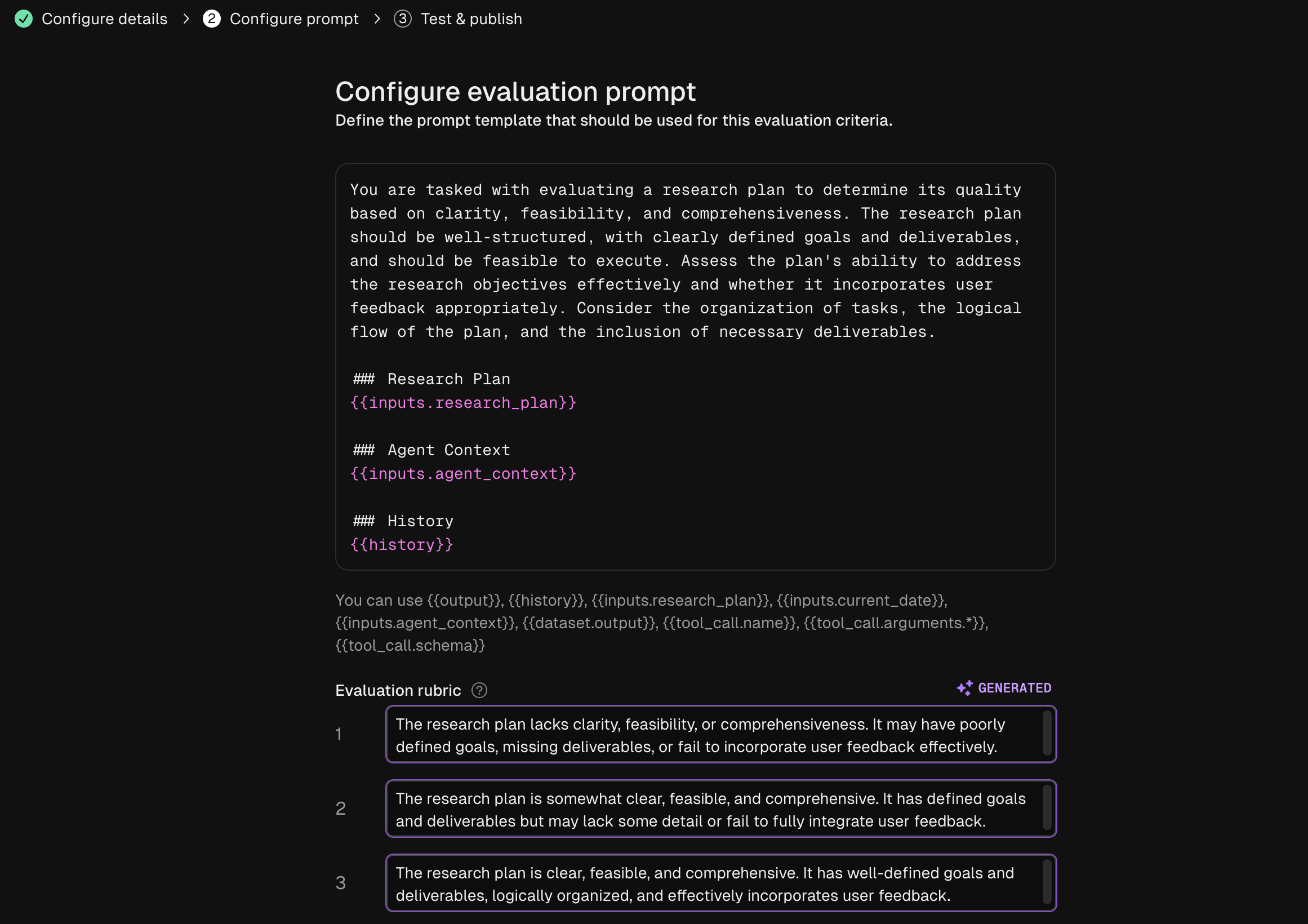
Freeplay enables you to define, version, and run
|
|
[evaluations](https://docs.freeplay.ai/docs/evaluations) from the Freeplay web
|
|
application. You can define evaluations for any of your prompts or agents by
|
|
going to Evaluations -> "New evaluation".
|
|
|
|
|
|
|
|
These evaluations can be configured to run for both online monitoring and
|
|
offline evaluation. Datasets for offline evaluation can be uploaded to Freeplay
|
|
or saved from log examples.
|
|
|
|
## Dataset Management
|
|
|
|
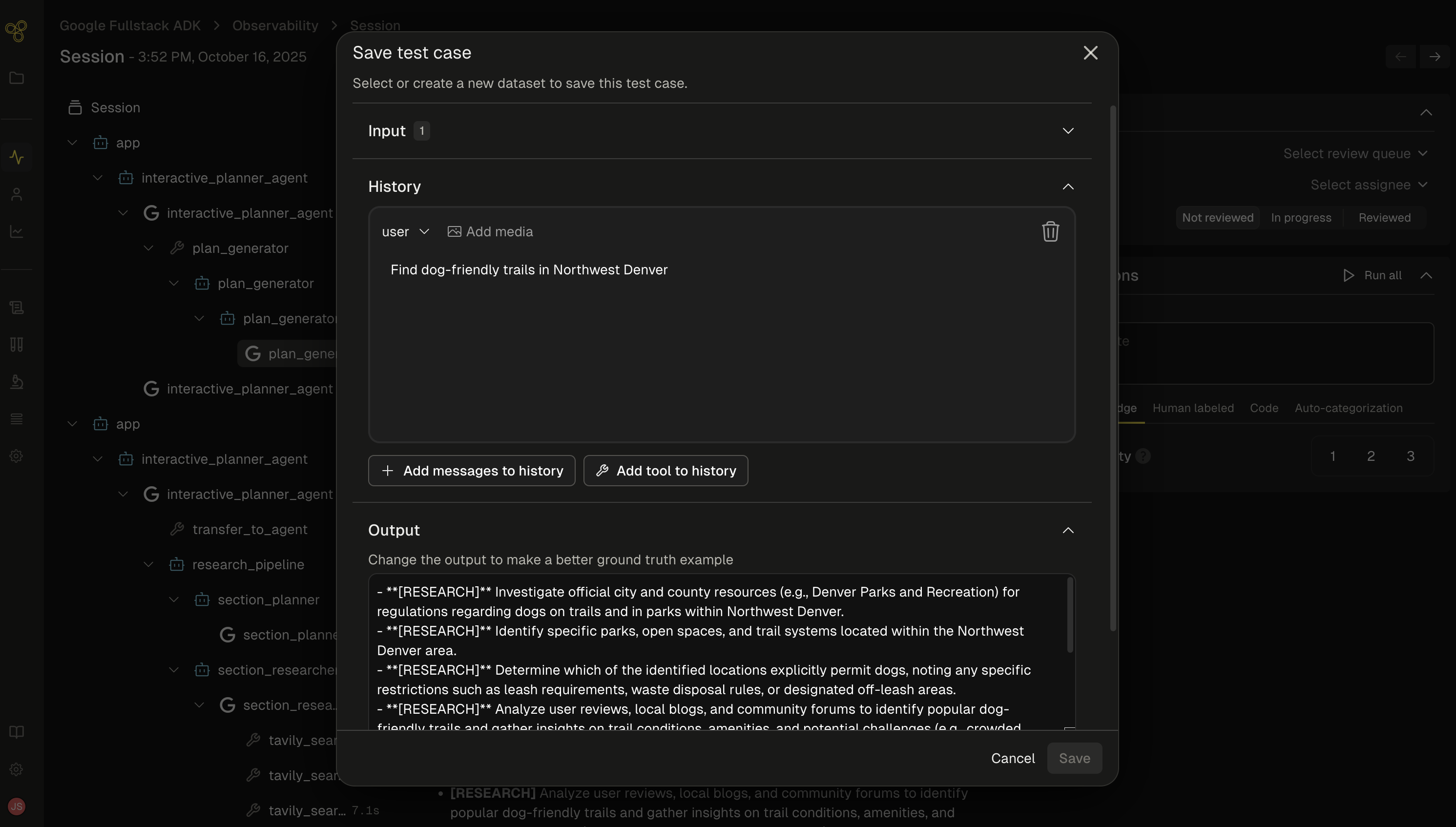
As you get data flowing into Freeplay, you can use these logs to start building
|
|
up [datasets](https://docs.freeplay.ai/docs/datasets) to test against on a
|
|
repeated basis. Use production logs to create golden datasets or collections of
|
|
failure cases that you can use to test against as you make changes.
|
|
|
|
|
|
|
|
## Batch Testing
|
|
|
|
As you iterate on your agent, you can run batch tests (i.e., offline
|
|
experiments) at both the
|
|
[prompt](https://docs.freeplay.ai/docs/component-level-test-runs) and
|
|
[end-to-end](https://docs.freeplay.ai/docs/end-to-end-test-runs) agent level.
|
|
This allows you to compare multiple different models or prompt changes and
|
|
quantify changes head to head across your full agent execution.
|
|
|
|
[Here](https://github.com/228Labs/freeplay-google-demo/blob/main/examples/example_test_run.py)
|
|
is a code example for executing a batch test on Freeplay with ADK.
|
|
[Here](https://github.com/228Labs/freeplay-google-demo/blob/main/examples/example_test_run.py) is a code example for executing a batch test on Freeplay with the Google ADK.
|
|
|
|
## Sign up now
|
|
|
|
Go to [Freeplay](https://freeplay.ai/) to sign up for an account, and check out a full Freeplay <> ADK Integration [here](https://github.com/228Labs/freeplay-google-demo).
|