mirror of
https://github.com/google/adk-docs.git
synced 2026-09-14 16:16:59 +08:00
 Joe Fernandez
f7ed80bbc6
Joe Fernandez
f7ed80bbc6
* docs: home page

* updates based on feedback

* respond to review feedback

* docs: update gemini selector strings to "flash-latest"

* Update homepage.css
139 lines
4.8 KiB
Markdown
139 lines
4.8 KiB
Markdown
---
|
|
catalog_title: W&B Weave
|
|
catalog_description: Log, visualize, and analyze model calls and agent performance
|
|
catalog_icon: /integrations/assets/weave.png
|
|
catalog_tags: ["observability"]
|
|
---
|
|
|
|
# W&B Weave observability for ADK
|
|
|
|
<div class="language-support-tag">
|
|
<span class="lst-supported">Supported in ADK</span><span class="lst-python">Python</span>
|
|
</div>
|
|
|
|
[W&B Weave](https://weave-docs.wandb.ai/) provides a powerful platform for logging and visualizing model calls. By integrating Google ADK with Weave, you can track and analyze your agent's performance and behavior using OpenTelemetry (OTEL) traces.
|
|
|
|
## Prerequisites
|
|
|
|
1. Sign up for an account at [WandB](https://wandb.ai).
|
|
|
|
2. Obtain your API key from [WandB Authorize](https://wandb.ai/authorize).
|
|
|
|
3. Configure your environment with the required API keys:
|
|
|
|
```bash
|
|
export WANDB_API_KEY=<your-wandb-api-key>
|
|
export GOOGLE_API_KEY=<your-google-api-key>
|
|
```
|
|
|
|
## Install Dependencies
|
|
|
|
Ensure you have the necessary packages installed:
|
|
|
|
```bash
|
|
pip install google-adk opentelemetry-sdk opentelemetry-exporter-otlp-proto-http
|
|
```
|
|
|
|
## Sending Traces to Weave
|
|
|
|
This example demonstrates how to configure OpenTelemetry to send Google ADK traces to Weave.
|
|
|
|
```python
|
|
# math_agent/agent.py
|
|
|
|
import base64
|
|
import os
|
|
from opentelemetry.exporter.otlp.proto.http.trace_exporter import OTLPSpanExporter
|
|
from opentelemetry.sdk import trace as trace_sdk
|
|
from opentelemetry.sdk.trace.export import SimpleSpanProcessor
|
|
from opentelemetry import trace
|
|
|
|
from google.adk.agents import LlmAgent
|
|
from google.adk.tools import FunctionTool
|
|
|
|
from dotenv import load_dotenv
|
|
|
|
load_dotenv()
|
|
|
|
# Configure Weave endpoint and authentication
|
|
WANDB_BASE_URL = "https://trace.wandb.ai"
|
|
PROJECT_ID = "your-entity/your-project" # e.g., "teamid/projectid"
|
|
OTEL_EXPORTER_OTLP_ENDPOINT = f"{WANDB_BASE_URL}/otel/v1/traces"
|
|
|
|
# Set up authentication
|
|
WANDB_API_KEY = os.getenv("WANDB_API_KEY")
|
|
AUTH = base64.b64encode(f"api:{WANDB_API_KEY}".encode()).decode()
|
|
|
|
OTEL_EXPORTER_OTLP_HEADERS = {
|
|
"Authorization": f"Basic {AUTH}",
|
|
"project_id": PROJECT_ID,
|
|
}
|
|
|
|
# Create the OTLP span exporter with endpoint and headers
|
|
exporter = OTLPSpanExporter(
|
|
endpoint=OTEL_EXPORTER_OTLP_ENDPOINT,
|
|
headers=OTEL_EXPORTER_OTLP_HEADERS,
|
|
)
|
|
|
|
# Create a tracer provider and add the exporter
|
|
tracer_provider = trace_sdk.TracerProvider()
|
|
tracer_provider.add_span_processor(SimpleSpanProcessor(exporter))
|
|
|
|
# Set the global tracer provider BEFORE importing/using ADK
|
|
trace.set_tracer_provider(tracer_provider)
|
|
|
|
# Define a simple tool for demonstration
|
|
def calculator(a: float, b: float) -> str:
|
|
"""Add two numbers and return the result.
|
|
|
|
Args:
|
|
a: First number
|
|
b: Second number
|
|
|
|
Returns:
|
|
The sum of a and b
|
|
"""
|
|
return str(a + b)
|
|
|
|
calculator_tool = FunctionTool(func=calculator)
|
|
|
|
# Create an LLM agent
|
|
root_agent = LlmAgent(
|
|
name="MathAgent",
|
|
model="gemini-flash-latest",
|
|
instruction=(
|
|
"You are a helpful assistant that can do math. "
|
|
"When asked a math problem, use the calculator tool to solve it."
|
|
),
|
|
tools=[calculator_tool],
|
|
)
|
|
```
|
|
|
|
## View Traces in Weave dashboard
|
|
|
|
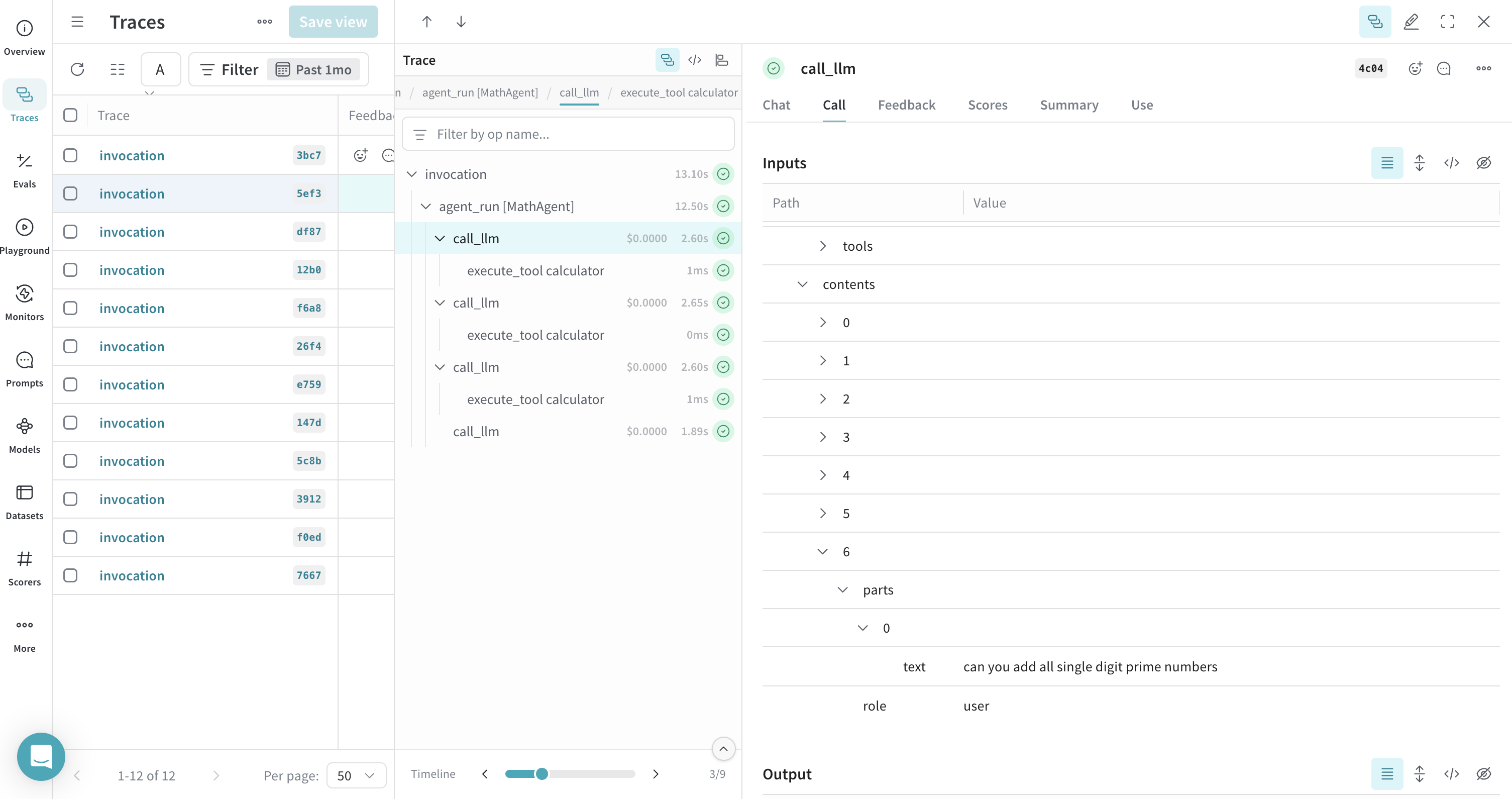
Once the agent runs, all its traces are logged to the corresponding project on [the Weave dashboard](https://wandb.ai/home).
|
|
|
|
|
|
|
|
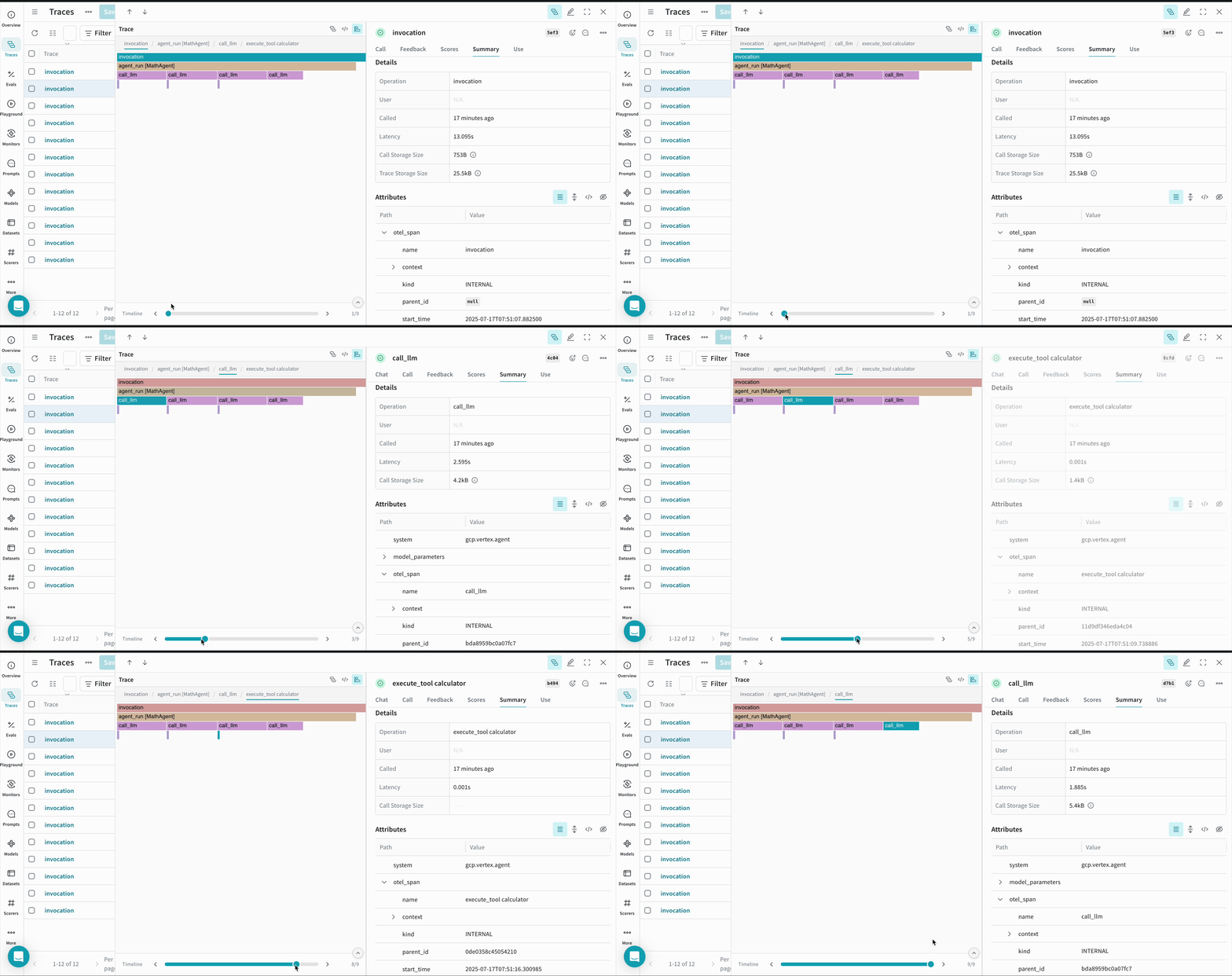
You can view a timeline of calls that your ADK agent made during execution -
|
|
|
|
|
|
|
|
|
|
## Notes
|
|
|
|
- **Environment Variables**: Ensure your environment variables are correctly set for both WandB and Google API keys.
|
|
- **Project Configuration**: Replace `<your-entity>/<your-project>` with your actual WandB entity and project name.
|
|
- **Entity Name**: You can find your entity name by visiting your [WandB dashboard](https://wandb.ai/home) and checking the **Teams** field in the left sidebar.
|
|
- **Tracer Provider**: It's critical to set the global tracer provider before using any ADK components to ensure proper tracing.
|
|
|
|
By following these steps, you can effectively integrate Google ADK with Weave, enabling comprehensive logging and visualization of your AI agents' model calls, tool invocations, and reasoning processes.
|
|
|
|
## Resources
|
|
|
|
- **[Send OpenTelemetry Traces to Weave](https://weave-docs.wandb.ai/guides/tracking/otel)** - Comprehensive guide on configuring OTEL with Weave, including authentication and advanced configuration options.
|
|
|
|
- **[Navigate the Trace View](https://weave-docs.wandb.ai/guides/tracking/trace-tree)** - Learn how to effectively analyze and debug your traces in the Weave UI, including understanding trace hierarchies and span details.
|
|
|
|
- **[Weave Integrations](https://weave-docs.wandb.ai/guides/integrations/)** - Explore other framework integrations and see how Weave can work with your entire AI stack.
|