mirror of
https://github.com/google/adk-docs.git
synced 2026-09-14 16:16:59 +08:00
 Hande Kafkas
27b0aa84cf
Hande Kafkas
27b0aa84cf
* Add Langfuse observability integration page

Document OpenInference-based tracing setup for ADK agents so Langfuse appears in the integrations catalog.

* add updates

---------

Co-authored-by: Joe Fernandez <931947+joefernandez@users.noreply.github.com>
179 lines
6.5 KiB
Markdown
179 lines
6.5 KiB
Markdown
---
|
|
catalog_title: Langfuse
|
|
catalog_description: Open-source AI engineering platform to debug, analyze, and iterate on LLM applications
|
|
catalog_icon: /integrations/assets/langfuse.png
|
|
catalog_tags: ["observability", "evaluation"]
|
|
---
|
|
|
|
# Langfuse observability for ADK
|
|
|
|
<div class="language-support-tag">
|
|
<span class="lst-supported">Supported in ADK</span><span class="lst-python">Python</span>
|
|
</div>
|
|
|
|
[Langfuse](https://langfuse.com) is an open-source LLM engineering platform for observability, evaluation, and prompt management. It captures detailed traces from ADK agents using the OpenTelemetry (OTel) protocol, so you can debug, evaluate, and iterate on agent apps in development and production.
|
|
|
|
## Overview
|
|
|
|
Langfuse captures traces from ADK using OpenTelemetry and supports the
|
|
[AI Engineering Loop](https://langfuse.com/academy/ai-engineering-loop):
|
|
|
|
- **[Trace](https://langfuse.com/academy/tracing)**: Capture the full path of a
|
|
request, including prompts, retrieved context, tool calls, outputs, latency,
|
|
and cost
|
|
- **[Monitor](https://langfuse.com/academy/monitoring)**: Track how the system
|
|
behaves over time and surface the traces that deserve attention, using
|
|
evaluation methods, user feedback, and cost or latency anomalies
|
|
- **[Build datasets](https://langfuse.com/academy/datasets)**: Turn real
|
|
scenarios from monitoring and expected scenarios from development into
|
|
repeatable test cases
|
|
- **[Experiment](https://langfuse.com/academy/experiments)**: Change variables
|
|
systematically (a prompt, a model, a retrieval strategy) and compare each
|
|
change against a stable baseline
|
|
- **[Evaluate](https://langfuse.com/academy/evaluate)**: Decide whether results
|
|
are good enough to ship using manual review, code evaluator checks, or
|
|
LLM-as-a-judge
|
|
|
|
## Installation
|
|
|
|
Install the required packages:
|
|
|
|
```bash
|
|
pip install langfuse "google-adk>=2" openinference-instrumentation-google-adk
|
|
```
|
|
|
|
`google-adk` 2.x requires Python 3.10 or later. Pinning `"google-adk>=2"` ensures
|
|
pip installs the current ADK 2.x release.
|
|
|
|
## Setup
|
|
|
|
Sign up at [cloud.langfuse.com](https://cloud.langfuse.com) or
|
|
[self-host](https://langfuse.com/self-hosting) the platform, then set your API
|
|
keys. Get keys from your project settings page. Also set a
|
|
[Gemini API key](https://aistudio.google.com/app/apikey):
|
|
|
|
```bash
|
|
export LANGFUSE_PUBLIC_KEY="pk-lf-..."
|
|
export LANGFUSE_SECRET_KEY="sk-lf-..."
|
|
export LANGFUSE_BASE_URL="https://cloud.langfuse.com" # EU region
|
|
# Other regions: https://us.cloud.langfuse.com (US),
|
|
# https://jp.cloud.langfuse.com (Japan), https://hipaa.cloud.langfuse.com (HIPAA)
|
|
export GOOGLE_API_KEY="your-gemini-api-key"
|
|
```
|
|
|
|
Initialize the Langfuse client and instrument ADK:
|
|
|
|
```python
|
|
from langfuse import get_client
|
|
from openinference.instrumentation.google_adk import GoogleADKInstrumentor
|
|
|
|
langfuse = get_client()
|
|
|
|
# Verify connection
|
|
if langfuse.auth_check():
|
|
print("Langfuse client is authenticated and ready!")
|
|
else:
|
|
print("Authentication failed. Please check your credentials and host.")
|
|
|
|
GoogleADKInstrumentor().instrument()
|
|
```
|
|
|
|
That's it. All ADK agent activity will now be traced and sent to your Langfuse
|
|
project automatically.
|
|
|
|
## Observe
|
|
|
|
With tracing initialized, run your ADK agent as usual and all interactions will
|
|
appear in Langfuse:
|
|
|
|
```python
|
|
from google.adk.agents import Agent
|
|
from google.adk.runners import Runner
|
|
from google.adk.sessions import InMemorySessionService
|
|
from google.genai import types
|
|
|
|
def say_hello():
|
|
return {"greeting": "Hello Langfuse 👋"}
|
|
|
|
agent = Agent(
|
|
name="hello_agent",
|
|
model="gemini-3.5-flash",
|
|
instruction="Always greet using the say_hello tool.",
|
|
tools=[say_hello],
|
|
)
|
|
|
|
APP_NAME = "hello_app"
|
|
USER_ID = "demo-user"
|
|
SESSION_ID = "demo-session"
|
|
|
|
session_service = InMemorySessionService()
|
|
# create_session is async → await it in notebooks
|
|
await session_service.create_session(app_name=APP_NAME, user_id=USER_ID, session_id=SESSION_ID)
|
|
|
|
runner = Runner(agent=agent, app_name=APP_NAME, session_service=session_service)
|
|
|
|
user_msg = types.Content(role="user", parts=[types.Part(text="hi")])
|
|
for event in runner.run(user_id=USER_ID, session_id=SESSION_ID, new_message=user_msg):
|
|
if event.is_final_response():
|
|
if event.content and event.content.parts:
|
|
print(event.content.parts[0].text)
|
|
elif event.error_message:
|
|
print(f"Agent error: {event.error_message}")
|
|
```
|
|
|
|
Langfuse automatically maps the `user_id` and `session_id` you pass to
|
|
`runner.run()` to the trace's **user** and **session** — you get
|
|
[user](https://langfuse.com/docs/observability/features/users) and
|
|
[session](https://langfuse.com/docs/observability/features/sessions) tracking
|
|
without any extra code.
|
|
|
|
## Named and filterable traces
|
|
|
|
By default, traces are named after the ADK app. Use
|
|
[`propagate_attributes`](https://langfuse.com/docs/observability/sdk/instrumentation)
|
|
to set a descriptive trace name, tags, and metadata so you can filter traces in
|
|
Langfuse.
|
|
|
|
Use the async `runner.run_async()` API when setting attributes this way. The
|
|
synchronous `runner.run()` executes the agent on a background worker thread, so
|
|
OpenTelemetry context (and attributes from `propagate_attributes`) does not
|
|
reach the ADK spans:
|
|
|
|
```python
|
|
from langfuse import propagate_attributes
|
|
|
|
SESSION_ID_2 = "demo-session-2"
|
|
await session_service.create_session(app_name=APP_NAME, user_id=USER_ID, session_id=SESSION_ID_2)
|
|
|
|
with propagate_attributes(
|
|
trace_name="hello-agent-request",
|
|
tags=["google-adk", "cookbook"],
|
|
metadata={"example": "named-trace"},
|
|
):
|
|
async for event in runner.run_async(user_id=USER_ID, session_id=SESSION_ID_2, new_message=user_msg):
|
|
if event.is_final_response():
|
|
if event.content and event.content.parts:
|
|
print(event.content.parts[0].text)
|
|
elif event.error_message:
|
|
print(f"Agent error: {event.error_message}")
|
|
```
|
|
|
|
## View traces in Langfuse
|
|
|
|
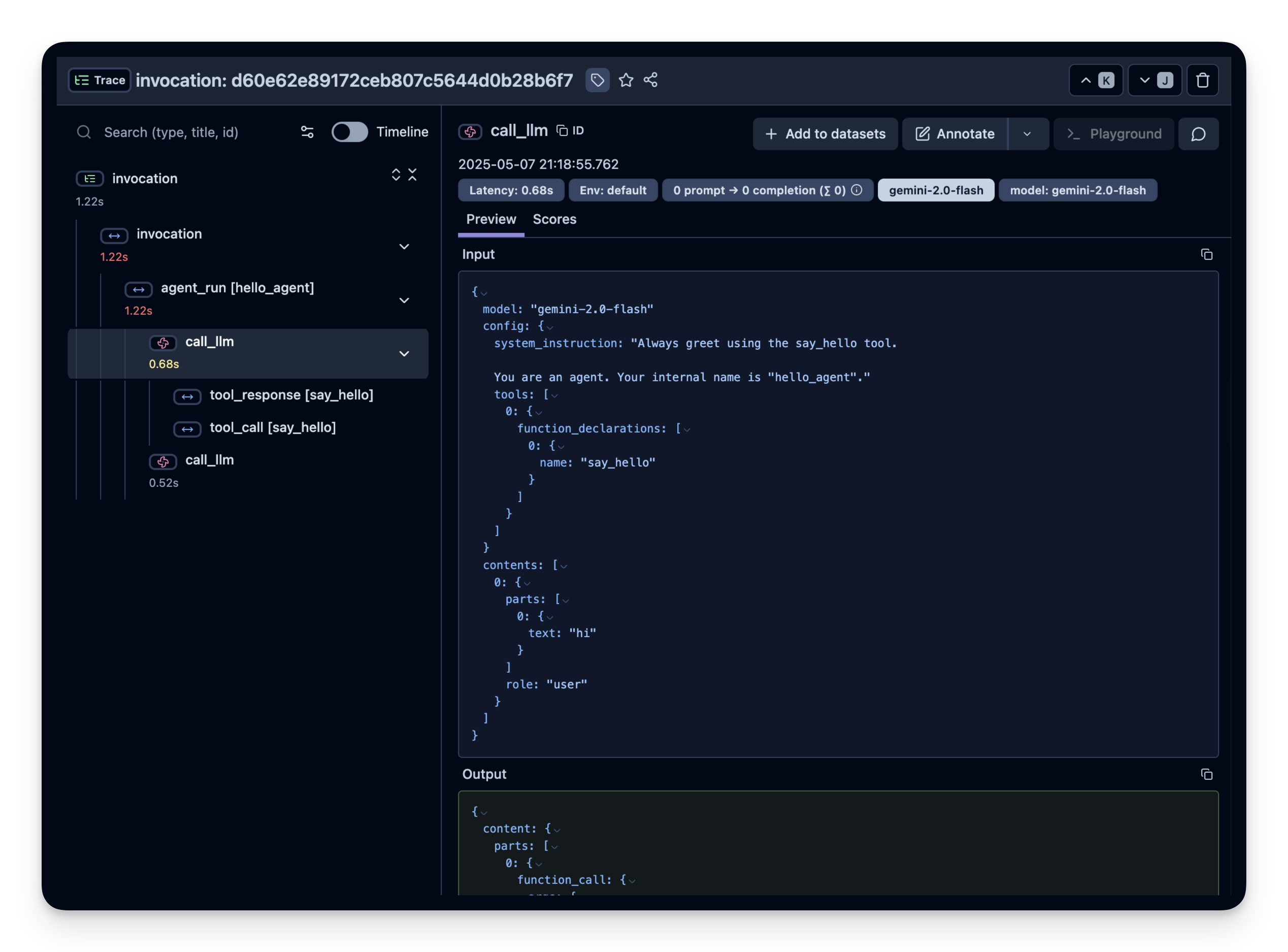
Open your **Langfuse dashboard → Traces** to inspect agent loops, tool calls,
|
|
and model generations. Traces are filterable by the users, sessions, and tags
|
|
set above.
|
|
|
|
|
|
|
|
For multi-agent pipelines, scoring traces with user feedback, and more examples,
|
|
see the [Langfuse ADK integration
|
|
guide](https://langfuse.com/integrations/frameworks/google-adk).
|
|
|
|
## Support and Resources
|
|
|
|
- [Langfuse Documentation](https://langfuse.com/docs)
|
|
- [ADK Integration Guide](https://langfuse.com/integrations/frameworks/google-adk)
|
|
- [Langfuse Repository on GitHub](https://github.com/langfuse/langfuse)
|
|
|