mirror of
https://github.com/infiniflow/ragflow.git
synced 2026-07-04 01:29:35 +08:00
 3a51c27a75
### What problem does this PR solve?

```
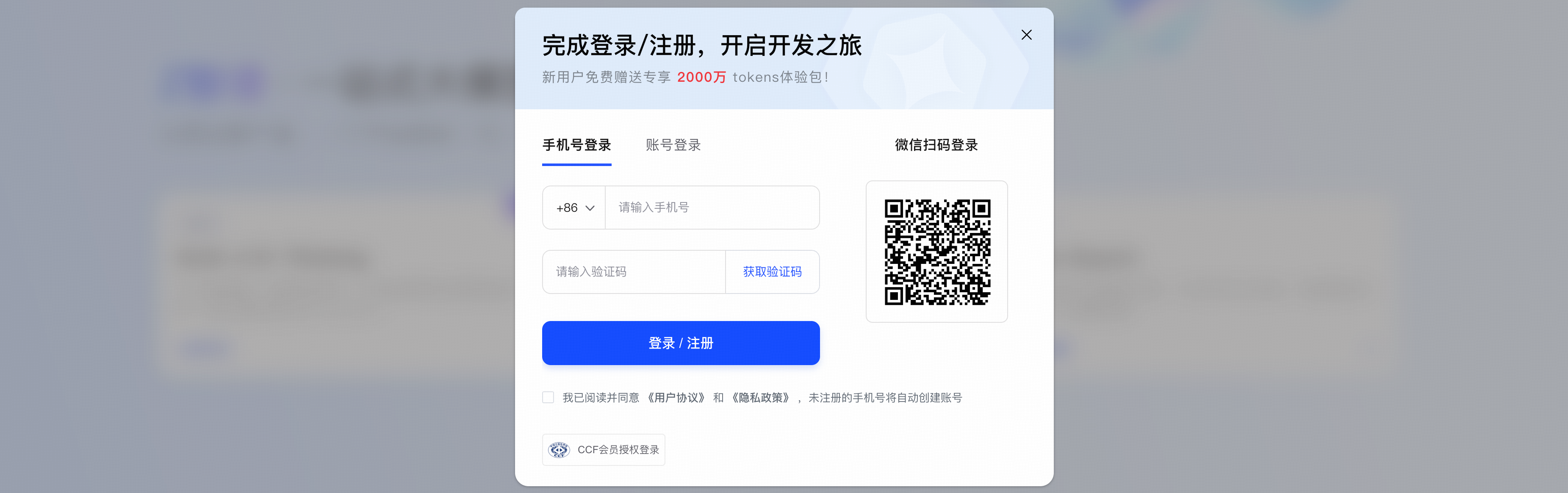
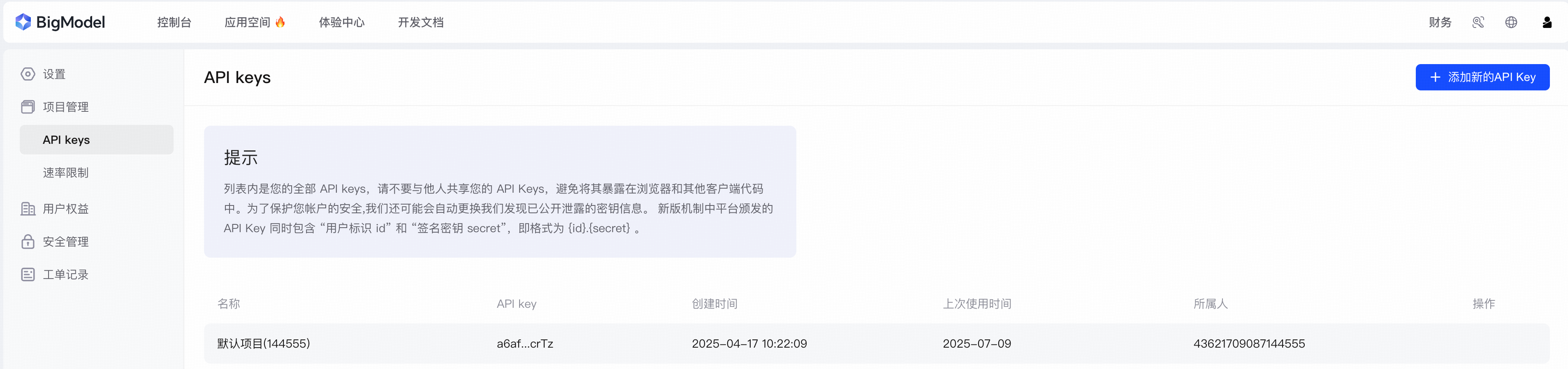
RAGFlow(user)> chat with 'glm-4.6v-flash@test@zhipu-ai' message 'What are the pics talk about?' image 'https://cdn.bigmodel.cn/static/logo/register.png' 'https://cdn.bigmodel.cn/static/logo/api-key.png'
Answer: The first picture shows a login/register modal with options for phone number login, account login, and WeChat QR code login, along with a prompt for new users to get a 20 million tokens experience package. The second picture displays the API keys management page of a platform, including a warning about API key security and a table listing existing API keys with details like creation time and usage history.
Time: 31.600545
RAGFlow(user)> chat with 'glm-4.6v-flash@test@zhipu-ai' message 'What are the video talk about?' video 'https://cdn.bigmodel.cn/agent-demos/lark/113123.mov'
Answer: Based on the sequence of frames provided, the video is a demonstration of a web search and navigation process.

1.  The video starts with a blank Google search page.
2.  The user types "智谱" (which is the Chinese name for the company Zhipu AI) into the search box.
3.  The search is initiated and the page shows "About 0 results".
4.  The search results load, showing information about Zhipu AI, including its website.
5.  The user clicks on the main website link (www.zhipuai.cn).
6.  The video ends by showing the homepage of Zhipu AI's website, titled "Z.ai GLM Large Model Open Platform".

In summary, the video is about searching for the company "智谱" (Zhipu AI) on Google and then navigating to its official website.
Time: 76.582520
```

### Type of change

- [x] New Feature (non-breaking change which adds functionality)

Signed-off-by: Jin Hai <haijin.chn@gmail.com>
RAGFlow CLI (Go Version)
This is the Go implementation of the RAGFlow command-line interface, compatible with the Python version's syntax.
Features
- Interactive mode and single command execution
- Full compatibility with Python CLI syntax
- Recursive descent parser for SQL-like commands
- Virtual Filesystem for intuitive resource management
- Support for all major commands:
- User management: LOGIN, REGISTER, CREATE USER, DROP USER, LIST USERS, etc.
- Service management: LIST SERVICES, SHOW SERVICE, STARTUP/SHUTDOWN/RESTART SERVICE
- Role management: CREATE ROLE, DROP ROLE, LIST ROLES, GRANT/REVOKE PERMISSION
- Dataset management via Virtual Filesystem:
ls,search,mkdir,cat,rm - Model management: SET/RESET DEFAULT LLM/VLM/EMBEDDING/etc.
- And more...
Usage
Build and run
go build -o ragflow_cli ./cmd/ragflow_cli.go
./ragflow_cli
Architecture
internal/cli/
├── cli.go              # Main CLI loop and interaction
├── client.go           # RAGFlowClient with Filesystem integration
├── http_client.go      # HTTP client for API communication
├── parser/             # Command parser package
│   ├── types.go        # Token and Command types
│   ├── lexer.go        # Lexical analyzer
│   └── parser.go       # Recursive descent parser
└── filesystem/         # Virtual Filesystem
    ├── engine.go       # Core engine: path resolution, command routing
    ├── types.go        # Node, Command, Result types
    ├── base.go         # Provider interface definition
    ├── dataset.go      # Dataset provider implementation
    ├── file.go         # File manager provider implementation
    └── utils.go        # Helper functions
Virtual Filesystem
The Virtual Filesystem provides a unified filesystem interface over RAGFlow's RESTful APIs.
Design Principles
- No Server-Side Changes: All logic implemented client-side using existing APIs
- Provider Pattern: Modular providers for different resource types (datasets, files, etc.)
- Unified Interface: Common
ls,search,mkdircommands across all providers - Path-Based Navigation: Virtual paths like
/datasets,/datasets/{name}/files
Supported Paths
| Path | Description |
|---|---|
/datasets |
List all datasets |
/datasets/{name} |
List documents in dataset (default behavior) |
/datasets/{name}/{doc} |
Get document info |
Commands
ls [path] [options] - List nodes at path
List contents of a path in the context filesystem.
Arguments:
[path]- Path to list (default: "datasets")
Options:
-n, --limit <number>- Maximum number of items to display (default: 10)-h, --help- Show ls help message
Examples:
ls                              # List all datasets (default 10)
ls -n 20                        # List 20 datasets
ls datasets/kb1                 # List files in kb1 dataset
ls datasets/kb1 -n 50           # List 50 files in kb1 dataset
search [options] - Search for content
Semantic search in datasets.
Options:
-n, --number- Number of top results to return (default: 10)
Output Formats:
- Default: JSON format
--output plain- Plain text format--output table- Table format with borders
Examples:
search "machine learning"                    # Search all datasets (JSON output)
search "neural networks" datasets/kb1        # Search in kb1
search "AI" datasets/kb1  --output plain     # Plain text output
search "RAG" -n 20                           # Return 20 results
cat <path> - Display content
Display document content (if available).
Examples:
cat myskills/doc.md   # Show content of doc.md file
cat datasets/kb1/document.pdf   # Error: cannot display binary file content
Command Examples
-- Authentication
LOGIN USER 'admin@example.com';

-- User management
REGISTER USER 'john' AS 'John Doe' PASSWORD 'secret';
CREATE USER 'jane' 'password123';
DROP USER 'jane';
LIST USERS;
SHOW USER 'john';

-- Service management
LIST SERVICES;
SHOW SERVICE 1;
STARTUP SERVICE 1;
SHUTDOWN SERVICE 1;
RESTART SERVICE 1;
PING;

-- Role management
CREATE ROLE admin DESCRIPTION 'Administrator role';
LIST ROLES;
GRANT read,write ON datasets TO ROLE admin;

-- Dataset management
CREATE DATASET 'my_dataset' WITH EMBEDDING 'text-embedding-ada-002' PARSER 'naive';
LIST DATASETS;
DROP DATASET 'my_dataset';

-- Model configuration
SET DEFAULT LLM 'gpt-4';
SET DEFAULT EMBEDDING 'text-embedding-ada-002';
RESET DEFAULT LLM;


## Parser Implementation

The parser uses a hand-written recursive descent approach instead of go-yacc for:
- Better control over error messages
- Easier to extend and maintain
- No code generation step required

The parser structure follows the grammar defined in the Python version, ensuring full syntax compatibility.