 Maximilian Roos
14580de79c
Maximilian Roos
14580de79c
Follow-up to the [`wt remove <path>` discussion on
#3480](https://github.com/max-sixty/worktrunk/pull/3480#issuecomment-5039137116),
widened from that one command to the whole surface. #3480 has since
landed and is merged in here — its duplicate-checkout warning composes
with this: the warning names the shadowed worktrees, and a path is how
you then address one.

## Audit

Verified against the built binary. wt had three answers to "what does
this token mean?":

| Route | `@` `-` `^` | worktree path | `pr:N` |
|---|---|---|---|
| `wt switch` (`resolve_switch_target`) | yes | only if absolute or ≥2
components, and not `--create` | yes |
| `wt remove` (`resolve_worktree_arg`) | yes | any token | no |
| everything else (raw `worktree_for_branch`) | **no** | **no** | no |

Same token, same cwd, two answers:

```console
$ wt remove inner     # ✓ Removed innerbranch worktree & branch
$ wt switch inner     # ✗ No branch named inner
```

And outside switch/remove the shortcuts didn't work at all — `wt step
diff --branch @` was `✗ Branch @ has no worktree`, while `wt config
state marker set --branch @` silently wrote state under the literal key
`@`. Separately, wt prints paths as `~/…` but wouldn't accept that form
back.

## Change

One canonicalizer in the lib, `Repository::resolve_worktree`, absorbing
the path fallback that lived in the bin crate's `resolve_worktree_arg`
(now deleted). Resolution order is documented once, on that function:
`@`, then `-`/`^`, then a branch with a worktree, then a path naming a
registered worktree, then the branch alone.

**Branch-first, everywhere.** A directory never shadows a branch that
shares its name; a path answers only what a branch cannot — a detached
worktree, or one of two checkouts of the same branch (#3480's case). The
`looks_like_path` shape gate is gone, so a single-component path
resolves like any other.

Two shapes cover what callers need: `require_worktree` for commands that
need a worktree to operate in, `require_selected_branch` for arguments
that key by branch. The merge/rebase target validators fall through to
the same path lookup, so a target can be named by the worktree it's
checked out in.

Routed through it: `switch` (including `--base`), `remove`, `step commit
--branch`, `step diff --branch` and its target, `step copy-ignored
--from`/`--to`, `step promote`, `step relocate`, `config state --branch`
(9 sites), and `merge` / `step rebase` / `step squash` / `step push`
targets.

`resolve_input_path` — already documented as the one resolution point
for user-supplied paths — now expands a leading `~`, so the tilde form
worktrunk prints is a form it reads back. `~user` stays literal; wt
doesn't reimplement that shell feature.

## Documentation

A path is an alias, not a second addressing scheme, so it is stated once
rather than on every argument: one paragraph in `wt switch`'s help and
one sentence on the addressing line in `worktrunk.md`. Argument
descriptions still read as branches. The two exceptions are the
arguments whose descriptions are already catalogues of accepted forms —
`wt switch`'s (`Branch, worktree path, shortcut, or PR/MR URL`) and `wt
remove`'s, which has named the path since before this branch. The
Worktree Model section of `CLAUDE.md` records which way to document it,
so the next argument doesn't grow its own copy.

## Two silent no-ops fixed along the way

- `wt step relocate <unmatched>` matched arguments against branch names
by string equality, so a typo filtered everything out and the empty
result rendered as `○ All worktrees are at expected paths` — a success
message for work that never happened. Every way an argument can fail to
land on a relocatable worktree now errors, including the detached and
prunable cases the new path route makes reachable.
- A selector matching nothing was reported as a branch without a
worktree, hinting `wt switch <token>` — which creates a worktree only
when the branch exists, so for a mistyped path it would just fail again.
`WorktreeSelectorNotFound` now says `No branch or worktree named X`; a
branch that genuinely exists without a checkout keeps the create hint.

## Testing

Full gate green: 4596 tests, lints, docs sync, `--features
shell-integration-tests` clippy. `codecov/patch` is 99.25% of diff hit
against a 97.93% target. New coverage:

- Unit: branch-and-path equivalence, branch-beats-same-named-directory,
detached-by-path (and its `require_selected_branch` refusal), shortcuts
never treated as paths, branch-only fallthrough, and the two distinct
not-found errors. Plus `expand_tilde` round-tripping
`format_path_for_display`.
- Integration: `switch` by relative/single-component/absolute/tilde
path, `--base` by path, `step diff --branch` by path and `@` (asserted
equal to the by-branch output), `config state --branch` set via `@` and
read via the worktree path, and both new relocate errors.

`wt remove`'s resolution is unchanged — it already had this rule; it now
shares the implementation. The 106-test `remove::` suite is untouched
and green.

- Integration: `wt step push <worktree-path>` (the
`require_target_branch` half of the target fallback), and `wt step
relocate` against a prunable worktree.

One diff line is unhit: `expand_tilde`'s fallback when `home_dir()`
returns `None`, which has no deterministic trigger. The `@`-resolution
backstop in `resolve_worktree` is untested for the same reason — no CLI
route reaches it — so it kept its original `match` arm rather than being
re-indented into the diff.

## Left out

`wt config state default-branch set` and `previous-branch set` take a
branch name as a *value to store* rather than a selector, so they still
take it literally.

> _This was written by Claude Code on behalf of Maximilian Roos_

🤖 Generated with [Claude Code](https://claude.com/claude-code)

---------

Co-authored-by: Claude Opus 5 (1M context) <noreply@anthropic.com>
13 KiB
 Worktrunk







July 2026: Worktrunk was released at the start of the year, and has quickly become the most popular git worktree manager. It's built with love (there's no slop!). Please let me know any frictions at all; I'm intensely focused on continuing to make Worktrunk excellent, and the biggest help is folks posting problems they perceive.
Worktrunk is a CLI for git worktree management, designed for running AI agents in parallel.
Worktrunk's three core commands make worktrees as easy as branches. Plus, Worktrunk has a bunch of quality-of-life features to simplify working with many parallel changes, including hooks to automate local workflows.
A quick demo:

📚 Full documentation at worktrunk.dev 📚
Context: git worktrees
AI agents like Claude Code and Codex can handle longer tasks without supervision, such that it's possible to manage 5-10+ in parallel. Git's native worktree feature give each agent its own working directory, so they don't step on each other's changes.
But the git worktree UX is clunky. Even a task as small as starting a new
worktree requires typing the branch name three times: git worktree add -b feat ../repo.feat, then cd ../repo.feat.
Worktrunk makes git worktrees as easy as branches
Worktrees are addressed by branch name; paths are computed from a configurable template. Commands that take a branch also accept the path of the worktree it is checked out in.
Start with the core commands
Core commands:
| Task | Worktrunk | Plain git |
|---|---|---|
| Switch worktrees | wt switch feat |
cd ../repo.feat |
| Create + start Claude | wt switch -c -x claude feat |
git worktree add -b feat ../repo.feat && \ cd ../repo.feat && \ claude |
| Clean up | wt remove |
cd ../repo && \ git worktree remove ../repo.feat && \ git branch -d feat |
| List with status | wt list |
git worktree list(paths only) |
Expand into the more advanced commands as needed
Workflow automation:
- Hooks — run commands on create, pre-merge, post-merge, etc
- LLM commit messages — generate commit messages from diffs
- Merge workflow — squash, rebase, merge, clean up in one command
- Interactive picker — browse worktrees with live diff and log previews
- Copy build caches — skip cold starts by sharing
target/,node_modules/, etc between worktrees wt list --full— CI status and AI-generated summaries per branch- PR checkout —
wt switch pr:123to jump straight to a PR's branch - Dev server per worktree —
hash_porttemplate filter gives each worktree a unique port - Aliases & per-branch variables — custom
wt <name>commands and branch-scoped state for hook templates - ...and lots more
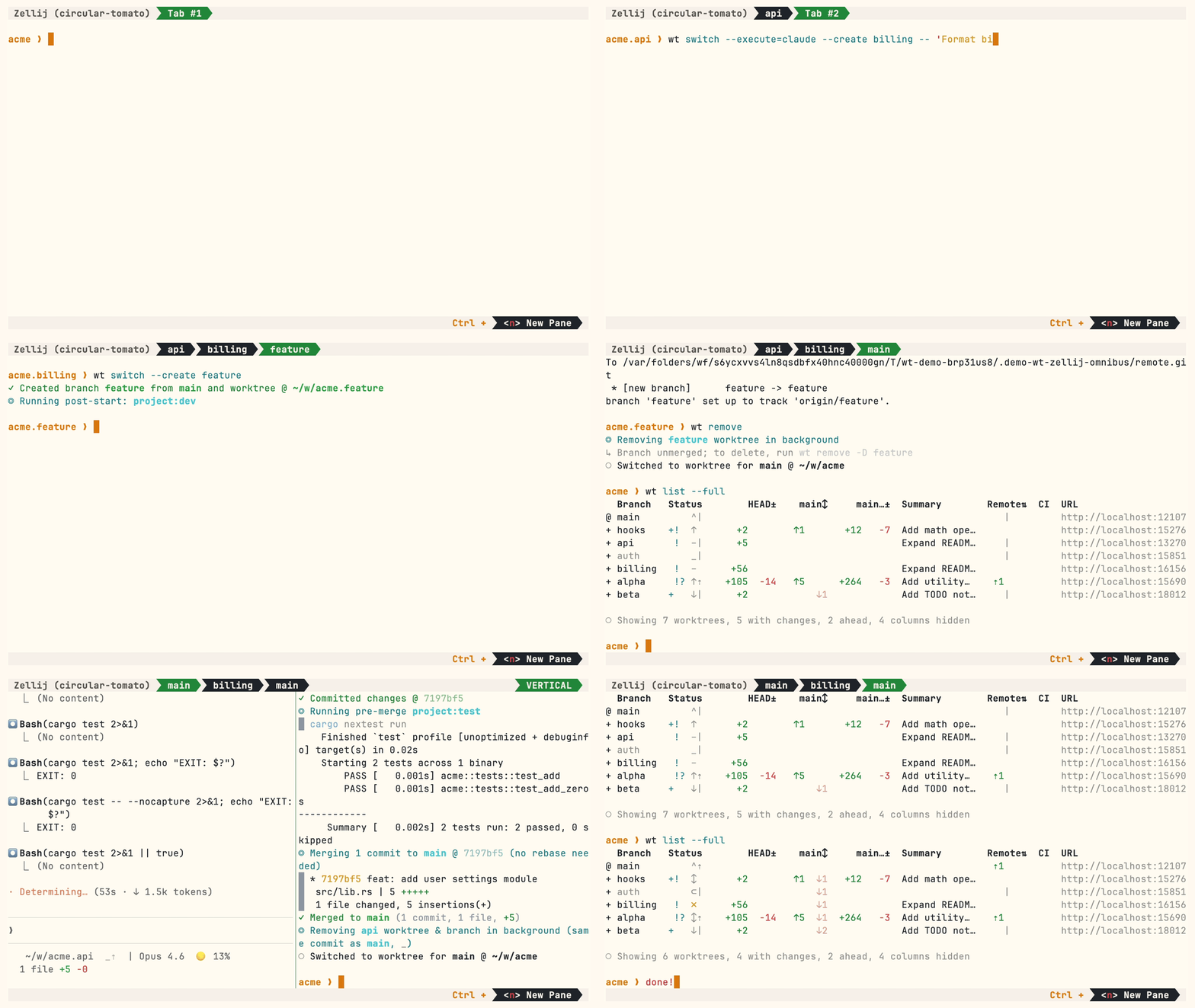
Multiple parallel agents, same simple commands:
Install
Homebrew (macOS & Linux):
brew install worktrunk && wt config shell install
Shell integration allows commands to change directories.
Cargo:
cargo install worktrunk && wt config shell install
Windows & other
Windows. wt defaults to Windows Terminal's command, so Winget additionally installs Worktrunk as git-wt to avoid the conflict:
winget install max-sixty.worktrunk
git-wt config shell install
Alternatively, disable Windows Terminal's alias (Settings → Apps → Advanced app settings → App execution aliases → "Terminal"/"Terminal Preview") to use wt directly.
Arch Linux:
sudo pacman -S worktrunk && wt config shell install
Conda / Pixi (community-maintained feedstock):
conda install -c conda-forge worktrunk && wt config shell install
Or with Pixi: pixi global install worktrunk && wt config shell install.
Quick start
Create a worktree for a new feature:
$ wt switch --create feature-auth
✓ Created branch feature-auth from main and worktree @ ~/repo.feature-auth
This creates a new branch and worktree, then switches to it. Do your work, then check all worktrees with wt list:
$ wt list
  Branch        Status        HEAD±    main↕     main…±  Remote⇅  Commit    Age   Message
@ feature-auth  +   ↑      +27   -8   ↑1       +31                4bc72dc9  2h    Add authenticat…
^ main              ^⇡                                    ⇡1      0e631add  1d    Initial commit

○ Showing 2 worktrees, 1 with changes, 1 ahead, 1 column hidden
The @ marks the current worktree. + means staged changes, ↑1 means 1 commit ahead of main, ⇡ means unpushed commits.
When done, either:
PR workflow — commit, push, open a PR, merge via GitHub/GitLab, then clean up:
wt step commit                    # commit staged changes
gh pr create                      # or glab mr create
wt remove                         # after PR is merged
Local merge — squash, rebase onto main, fast-forward merge, clean up:
$ wt merge main
◎ Generating commit message and committing changes... (2 files, +53, no squashing needed)
  Add authentication module
✓ Committed changes @ a1b2c3d
◎ Merging 1 commit to main @ a1b2c3d (no rebase needed)
  * a1b2c3d Add authentication module
   auth.rs | 51 +++++++++++++++++++++++++++++++++++++++++++++++++++
   lib.rs  |  2 ++
   2 files changed, 53 insertions(+)
✓ Merged to main (1 commit, 2 files, +53)
◎ Removing feature-auth worktree & branch in background (same commit as main, _)
○ Switched to worktree for main @ ~/repo
For parallel agents, create multiple worktrees and launch an agent in each:
wt switch -x claude -c feature-a -- 'Add user authentication'
wt switch -x claude -c feature-b -- 'Fix the pagination bug'
wt switch -x claude -c feature-c -- 'Write tests for the API'
The -x flag runs a command after switching; arguments after -- are passed to it. Configure post-start hooks to automate setup (install deps, start dev servers).
Next steps
- Learn the core commands:
wt switch,wt list,wt merge,wt remove - Set up hooks for automated setup
- Explore LLM commit messages, interactive picker, Claude Code integration, CI status & PR links
- Browse tips & patterns for recipes: aliases, dev servers, databases, agent handoffs, and more
- Extending Worktrunk — customize workflows with hooks & aliases
- Run
wt --helporwt <command> --helpfor quick CLI reference
Further reading
- Claude Code: Best practices for agentic coding — Anthropic's official guide, including the worktree pattern
- Shipping faster with Claude Code and Git Worktrees — incident.io's workflow for parallel agents
- Git worktree pattern discussion — Community discussion in the Claude Code repo
- @DevOpsToolbox's video on Worktrunk
- git-worktree documentation — Official git reference
Contributing
- ⭐ Star the repo
- Tell a friend about Worktrunk
- Open an issue — feedback, feature requests, even a small friction or imperfect user message, or a worktree pain not yet solved
- Share: X · Reddit · LinkedIn
📚 Full documentation at worktrunk.dev 📚