 Pat Sukprasert
1b35d1482a
Pat Sukprasert
1b35d1482a
* docs: add MLflow AI Gateway model provider page

Adds a model provider page showing how to connect ADK agents to
MLflow AI Gateway via the LiteLlm wrapper with a custom api_base.

* docs: add Create Endpoint screenshot

* docs: move MLflow AI Gateway to integrations section

Per reviewer feedback: move the gateway page from agents/models/ to
integrations/ as a standalone integration page. Rename the existing
MLflow tracing page catalog_title to "MLflow Tracing" to distinguish
the two entries.

* Remove nav entry for integrations

* Additional cleanup / redirects / renames

* Additional edits

---------

Co-authored-by: Kristopher Overholt <koverholt@google.com>
4.2 KiB
catalog_title, catalog_description, catalog_icon, catalog_tags
| catalog_title | catalog_description | catalog_icon | catalog_tags | |
|---|---|---|---|---|
| MLflow Tracing | Ingest OpenTelemetry traces for agent runs, tool calls, and model requests | /integrations/assets/mlflow.png |
|
MLflow observability for ADK
MLflow Tracing provides first-class support for ingesting OpenTelemetry (OTel) traces. Google ADK emits OTel spans for agent runs, tool calls, and model requests, which you can send directly to an MLflow Tracking Server for analysis and debugging.
Prerequisites
- MLflow version 3.6.0 or newer. OpenTelemetry ingestion is only supported in MLflow 3.6.0+.
- A SQL-based backend store (e.g., SQLite, PostgreSQL, MySQL). File-based stores do not support OTLP ingestion.
- Google ADK installed in your environment.
Install dependencies
pip install "mlflow>=3.6.0" google-adk opentelemetry-sdk opentelemetry-exporter-otlp-proto-http
Start the MLflow Tracking Server
Start MLflow with a SQL backend and a port (5000 in this example):
mlflow server --backend-store-uri sqlite:///mlflow.db --port 5000
You can point --backend-store-uri to other SQL backends (PostgreSQL, MySQL,
MSSQL). OTLP ingestion is not supported with file-based backends.
Configure OpenTelemetry (required)
You must configure an OTLP exporter and set a global tracer provider before using any ADK components so that spans are emitted to MLflow.
Initialize the OTLP exporter and global tracer provider in code before importing or constructing ADK agents/tools:
# my_agent/agent.py
from opentelemetry import trace
from opentelemetry.exporter.otlp.proto.http.trace_exporter import OTLPSpanExporter
from opentelemetry.sdk.trace import TracerProvider
from opentelemetry.sdk.trace.export import SimpleSpanProcessor

exporter = OTLPSpanExporter(
    endpoint="http://localhost:5000/v1/traces",
    headers={"x-mlflow-experiment-id": "123"}  # replace with your experiment id
)

provider = TracerProvider()
provider.add_span_processor(SimpleSpanProcessor(exporter))
trace.set_tracer_provider(provider)  # set BEFORE importing/using ADK
This configures the OpenTelemetry pipeline and sends ADK spans to the MLflow server on each run.
Example: Trace an ADK agent
Now you can add the agent code for a simple math agent, after the code that sets up the OTLP exporter and tracer provider:
# my_agent/agent.py
from google.adk.agents import LlmAgent
from google.adk.tools import FunctionTool


def calculator(a: float, b: float) -> str:
    """Add two numbers and return the result."""
    return str(a + b)


calculator_tool = FunctionTool(func=calculator)

root_agent = LlmAgent(
    name="MathAgent",
    model="gemini-flash-latest",
    instruction=(
        "You are a helpful assistant that can do math. "
        "When asked a math problem, use the calculator tool to solve it."
    ),
    tools=[calculator_tool],
)
Run the agent with:
adk run my_agent
And ask it a math problem:
What is 12 + 34?
You should then see output similar to:
[MathAgent]: The answer is 46.
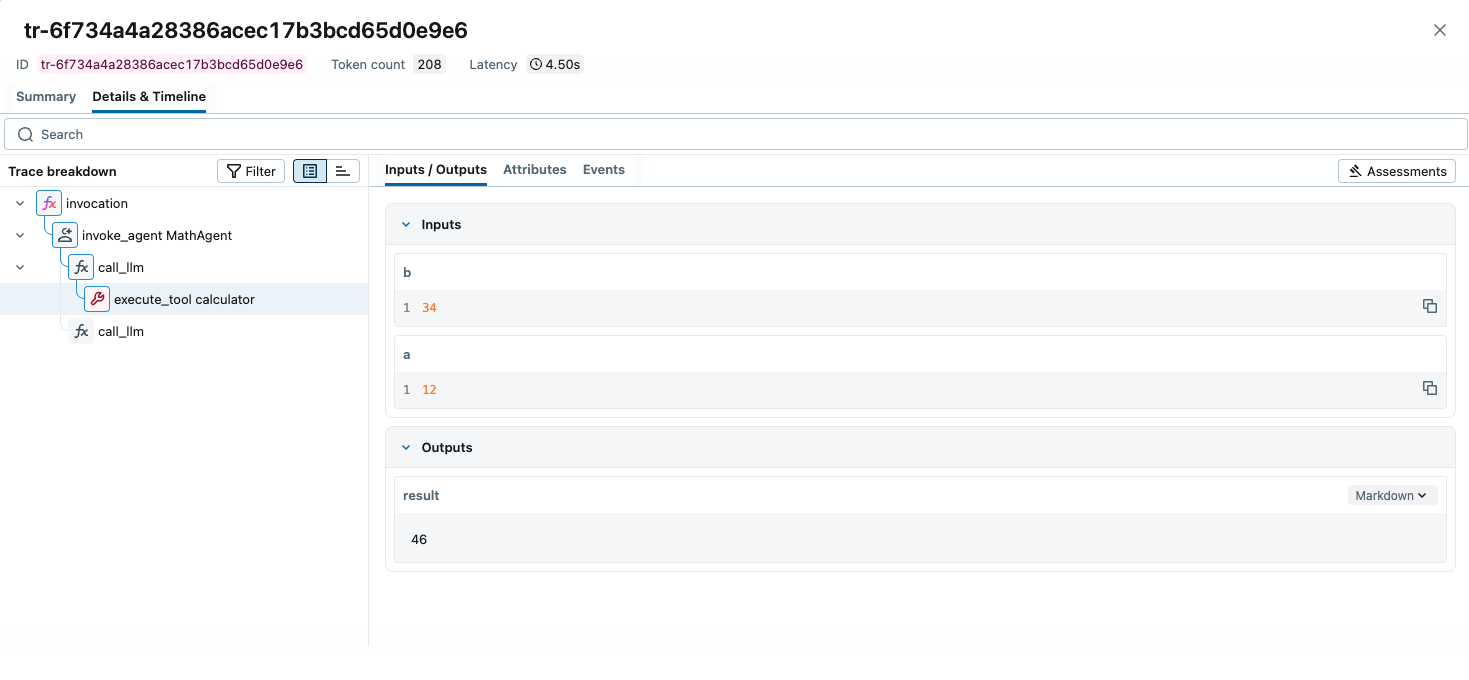
View traces in MLflow
Open the MLflow UI at http://localhost:5000, select your experiment, and
inspect the trace tree and spans generated by your ADK agent.
Tips
- Set the tracer provider before importing or initializing ADK objects so all spans are captured.
- Behind a proxy or on a remote host, replace
localhost:5000with your server address.
Resources
- MLflow Tracing Documentation: Official documentation for MLflow Tracing that covers other library integrations and downstream usage of traces, such as evaluation, monitoring, searching, and more.
- OpenTelemetry in MLflow: Detailed guide on how to use OpenTelemetry with MLflow.
- MLflow for Agents: Comprehensive guide on how to use MLflow for building production-ready agents.