 George Weale
d9e930e823
George Weale
d9e930e823
* docs(integrations): fix unresolvable imports and stale API claims

* docs: apply style pass and drop out-of-scope import cleanup

* docs(integrations): address review feedback on gcs, cloud-trace, reflect-and-retry

Restore the gcs_ tool name prefixes in the GCS tool tables, since both
toolsets set tool_name_prefix="gcs" and the tables list names as the
model sees them. Use the current Agent Platform SDK name in cloud-trace
prose, make the reflect-and-retry failure description language-neutral
for Python and Go, and drop the redundant re-export clause.

* docs(gcs): note that tool_filter matches unprefixed tool names

Tool filtering runs inside get_tools() against the unprefixed name, and
get_tools_with_prefix() applies the gcs_ prefix afterwards, so the names
in the tables are not the names tool_filter expects.

* docs(computer-use): drop unused Gemini and override imports

---------

Co-authored-by: Kristopher Overholt <koverholt@google.com>
7.5 KiB
catalog_title, catalog_description, catalog_icon, catalog_tags
| catalog_title | catalog_description | catalog_icon | catalog_tags | ||
|---|---|---|---|---|---|
| Freeplay | Use Freeplay to build, optimize, and evaluate AI agents with end-to-end observability | /integrations/assets/freeplay.png |
|
Freeplay observability for ADK
Freeplay provides an end-to-end workflow for building and optimizing AI agents, and it can be integrated with ADK. With Freeplay your whole team can easily collaborate to iterate on agent instructions (prompts), experiment with and compare different models and agent changes, run evals both offline and online to measure quality, monitor production, and review data by hand.
Key benefits of Freeplay:
- Simple observability - focused on agents, LLM calls and tool calls for easy human review
- Online evals/automated scorers - for error detection in production
- Offline evals and experiment comparison - to test changes before deploying
- Prompt management - supports pushing changes straight from the Freeplay playground to code
- Human review workflow - for collaboration on error analysis and data annotation
- Powerful UI - makes it possible for domain experts to collaborate closely with engineers
Freeplay and ADK complement one another. ADK gives you a powerful and expressive agent orchestration framework while Freeplay plugs in for observability, prompt management, evaluation and testing. Once you integrate with Freeplay, you can update prompts and evals from the Freeplay UI or from code, so that anyone on your team can contribute.
Getting Started
Below is a guide for getting started with Freeplay and ADK. You can also find a full sample ADK agent repo here.
Create a Freeplay Account
Sign up for a free Freeplay account.
After creating an account, you can define the following environment variables:
FREEPLAY_PROJECT_ID=
FREEPLAY_API_KEY=
FREEPLAY_API_URL=
Use Freeplay ADK Library
Install the Freeplay ADK library:
pip install freeplay-python-adk
Freeplay will automatically capture OTel logs from your ADK application when you initialize observability:
from freeplay_python_adk.client import FreeplayADK
FreeplayADK.initialize_observability()
You'll also want to pass in the Freeplay plugin to your App:
from app.agent import root_agent
from freeplay_python_adk.freeplay_observability_plugin import FreeplayObservabilityPlugin
from google.adk.apps import App

app = App(
    name="app",
    root_agent=root_agent,
    plugins=[FreeplayObservabilityPlugin()],
)

__all__ = ["app"]
You can now use ADK as you normally would, and you will see logs flowing to Freeplay in the Observability section.
Observability
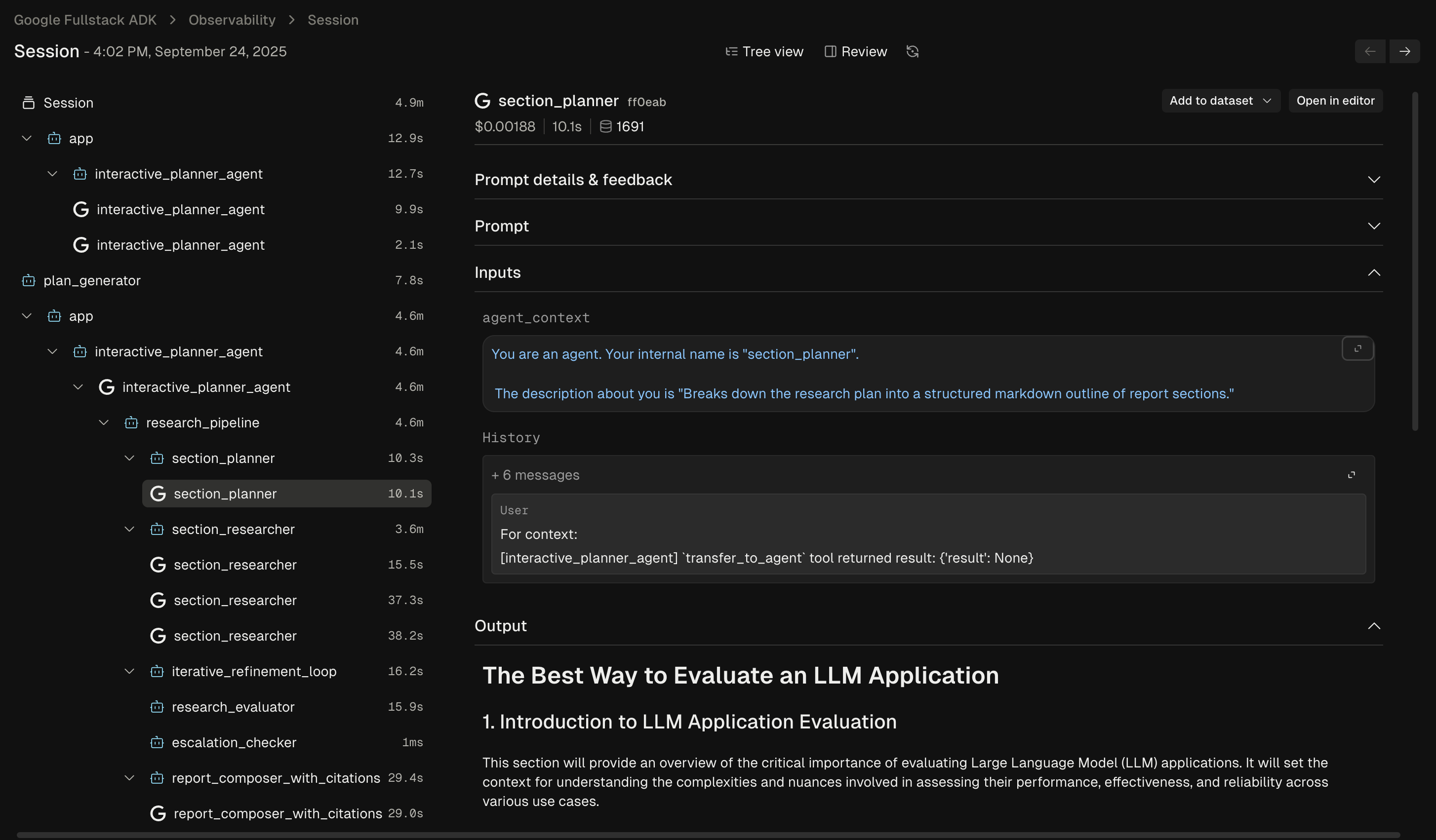
Freeplay's Observability feature gives you a clear view into how your agent is behaving in production. You can dig into individual agent traces to understand each step and diagnose issues:
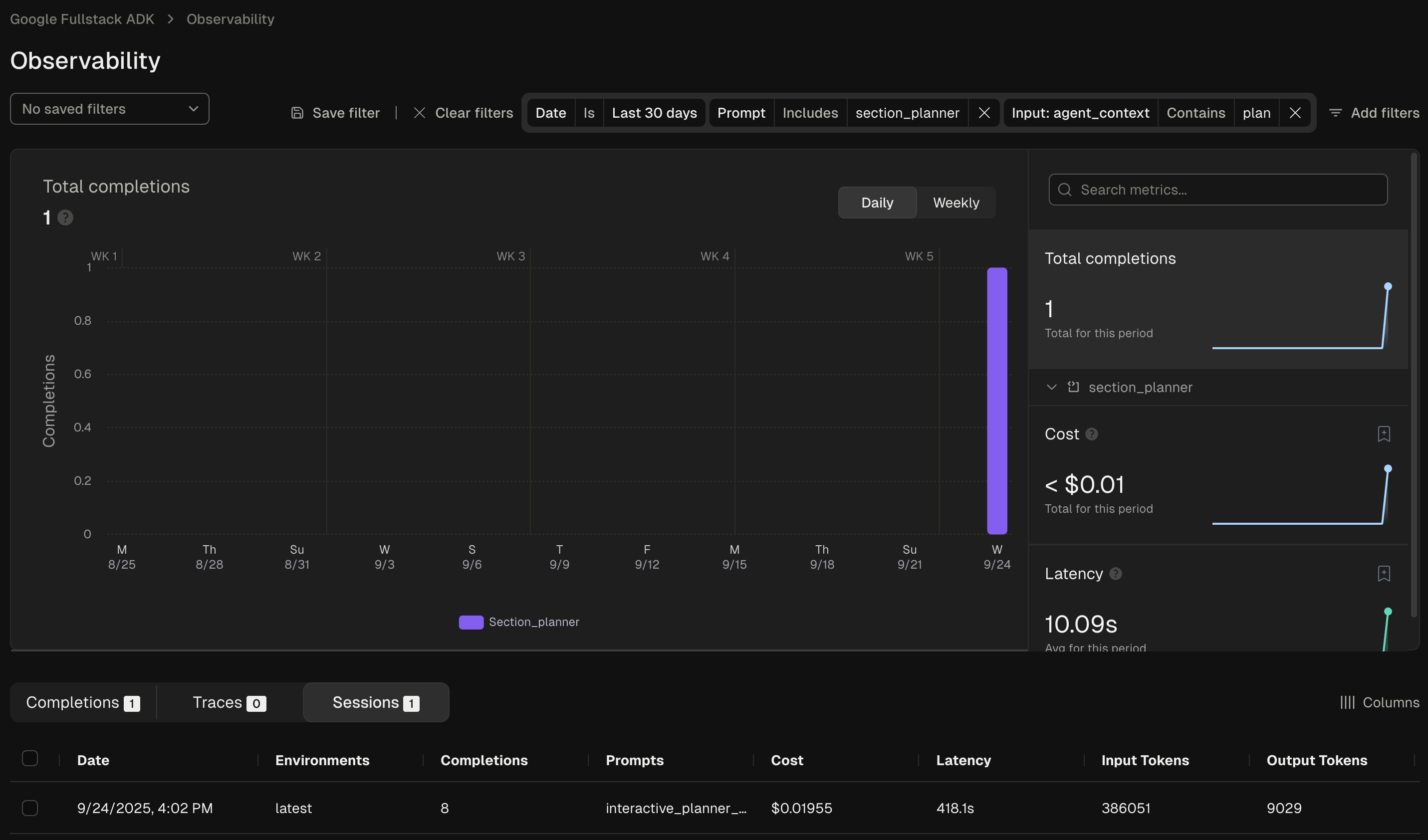
You can also use Freeplay's filtering functionality to search and filter the data across any segment of interest:
Prompt Management (optional)
Freeplay offers native prompt management, which simplifies the process of version and testing different prompt versions. It allows you to experiment with changes to ADK agent instructions in the Freeplay UI, test different models, and push updates straight to your code, similar to a feature flag.
To leverage Freeplay's prompt management capabilities alongside ADK, you'll want
to use the Freeplay ADK agent wrapper. FreeplayLLMAgent extends ADK's base
LlmAgent class, so instead of having to hard code your prompts as agent
instructions, you can version prompts in the Freeplay application.
First define a prompt in Freeplay by going to Prompts -> Create prompt template:
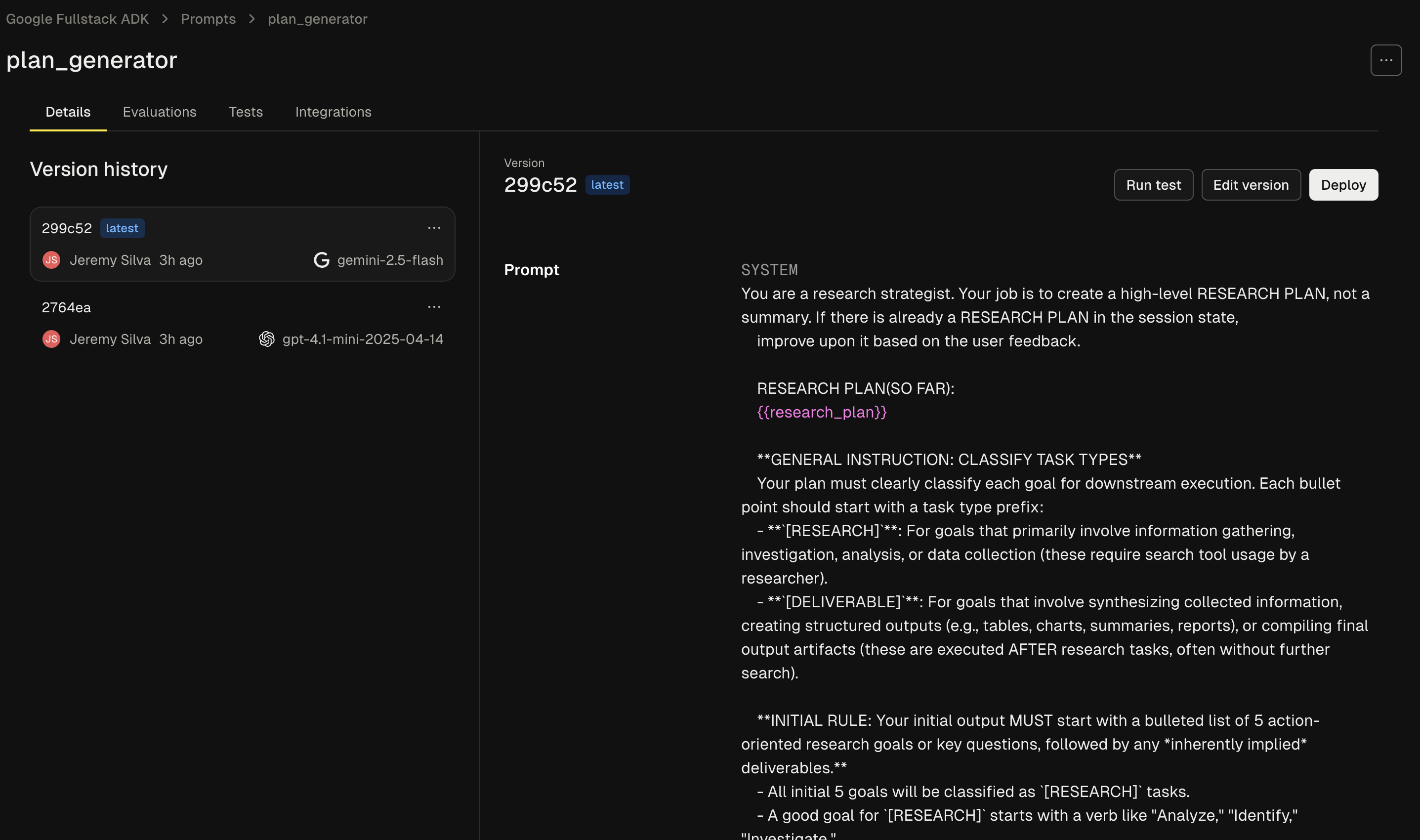
When creating your prompt template you'll need to add 3 elements, as described in the following sections:
System Message
This corresponds to the "instructions" section in your code.
Agent Context Variable
Adding the following to the bottom of your system message will create a variable for the ongoing agent context to be passed through:
{{agent_context}}
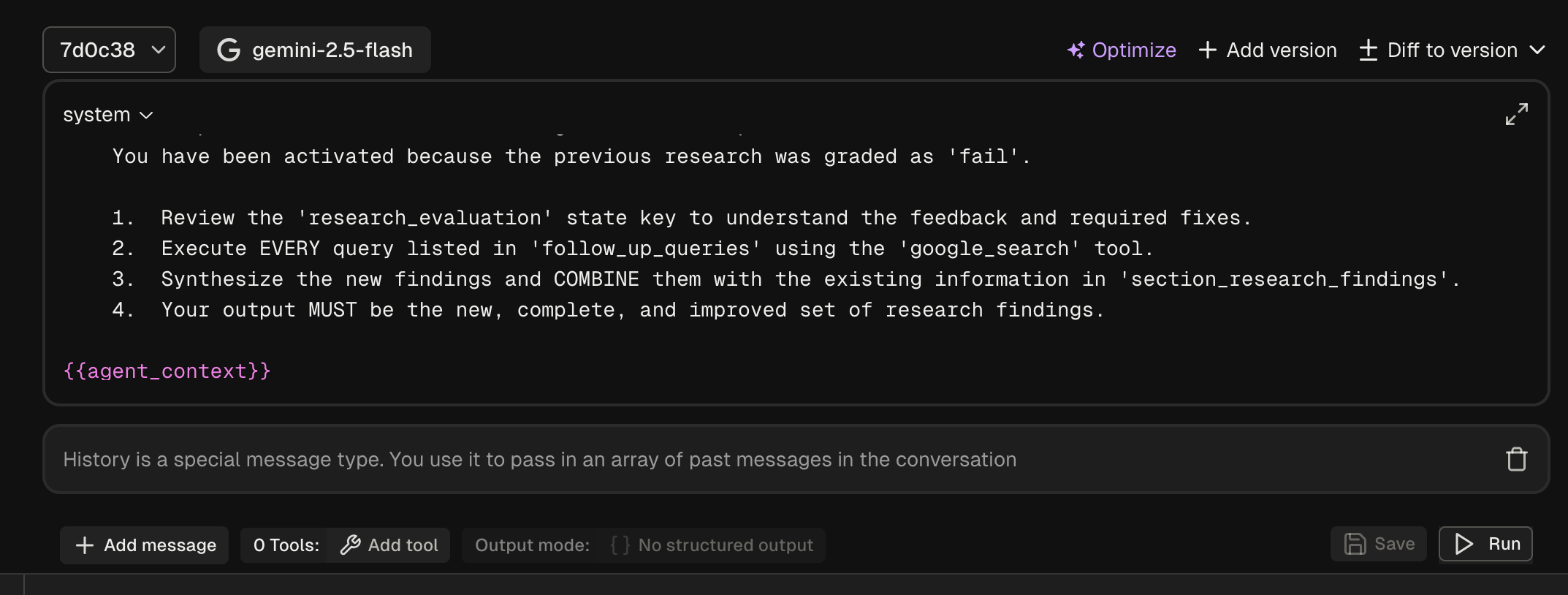
History Block
Click new message and change the role to 'history'. This will ensure the past messages are passed through when present.
Now in your code you can use the FreeplayLLMAgent:
from freeplay_python_adk.client import FreeplayADK
from freeplay_python_adk.freeplay_llm_agent import (
    FreeplayLLMAgent,
)

FreeplayADK.initialize_observability()

root_agent = FreeplayLLMAgent(
    name="social_product_researcher",
    tools=[tavily_search],
)
When the social_product_researcher is invoked, the prompt will be
retrieved from Freeplay and formatted with the proper input variables.
Evaluation
Freeplay enables you to define, version, and run evaluations from the Freeplay web application. You can define evaluations for any of your prompts or agents by going to Evaluations -> "New evaluation".
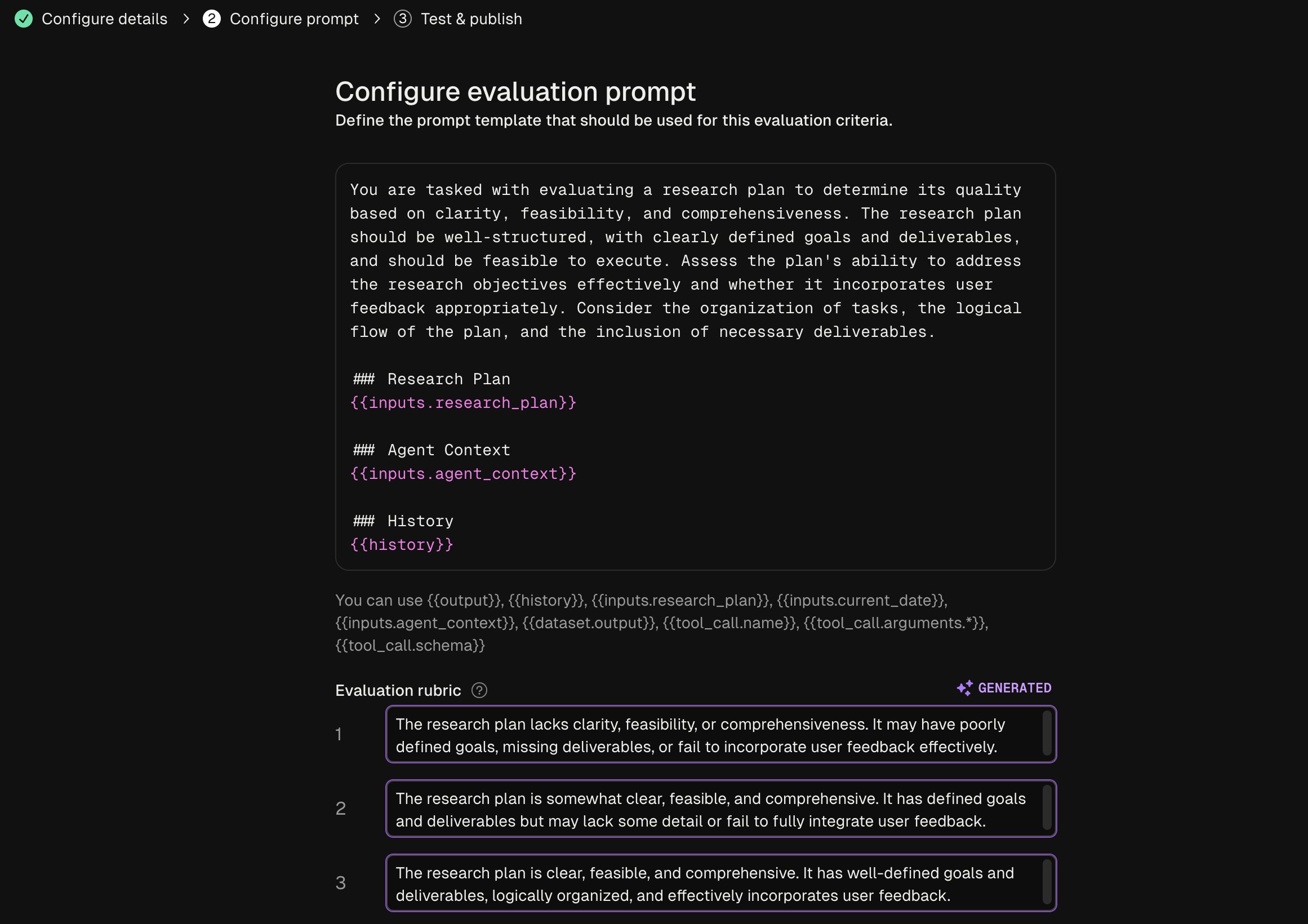
These evaluations can be configured to run for both online monitoring and offline evaluation. Datasets for offline evaluation can be uploaded to Freeplay or saved from log examples.
Dataset Management
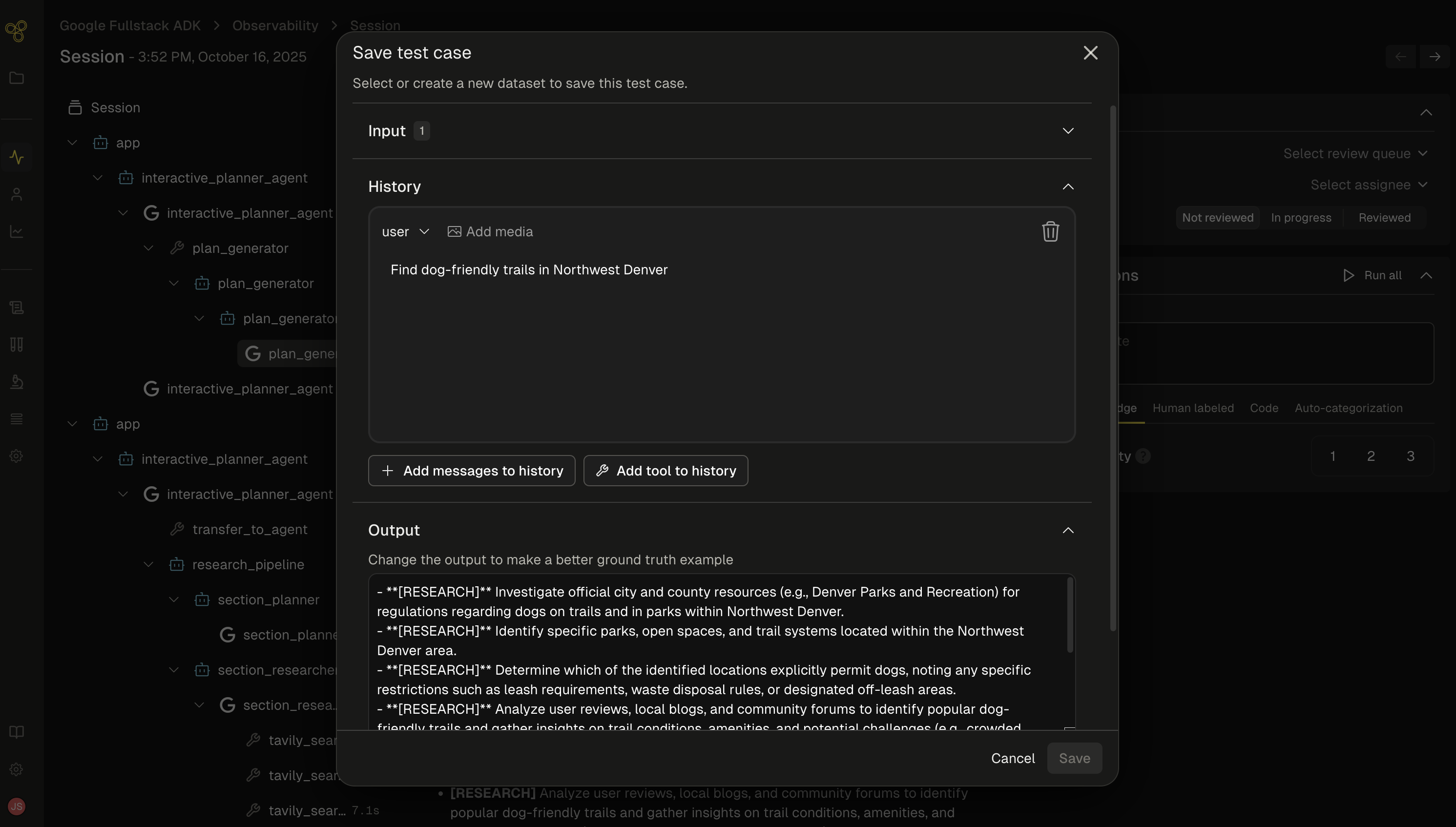
As you get data flowing into Freeplay, you can use these logs to start building up datasets to test against on a repeated basis. Use production logs to create golden datasets or collections of failure cases that you can use to test against as you make changes.
Batch Testing
As you iterate on your agent, you can run batch tests (i.e., offline experiments) at both the prompt and end-to-end agent level. This allows you to compare multiple different models or prompt changes and quantify changes head to head across your full agent execution.
Here is a code example for executing a batch test on Freeplay with ADK.
Sign up now
Go to Freeplay to sign up for an account, and check out a full Freeplay <> ADK Integration here